AI Tools That Do Coding, Writing, and Research Better Than ChatGPT
ChatGPT’s market share dropped 19 points in twelve months. After 8 weeks of hands-on testing across 40+ tasks, here’s where it still earns its place — and where specific alternatives beat it badly.
ChatGPT is a capable generalist. It is not the best tool at any specific job anymore.
- For coding: Claude Code leads SWE-bench Verified at 80.8%. Cursor dominates daily IDE workflows. Copilot is the budget entry point at $10/month.
- For writing: Claude produces the most natural, human-sounding long-form prose of any model tested. Blind tests consistently prefer it over GPT and Gemini.
- For research: Perplexity Sonar Pro cites sources with 94.3% accuracy. ChatGPT deep research is more comprehensive but takes 10–25 minutes per query and is locked to paid plans.
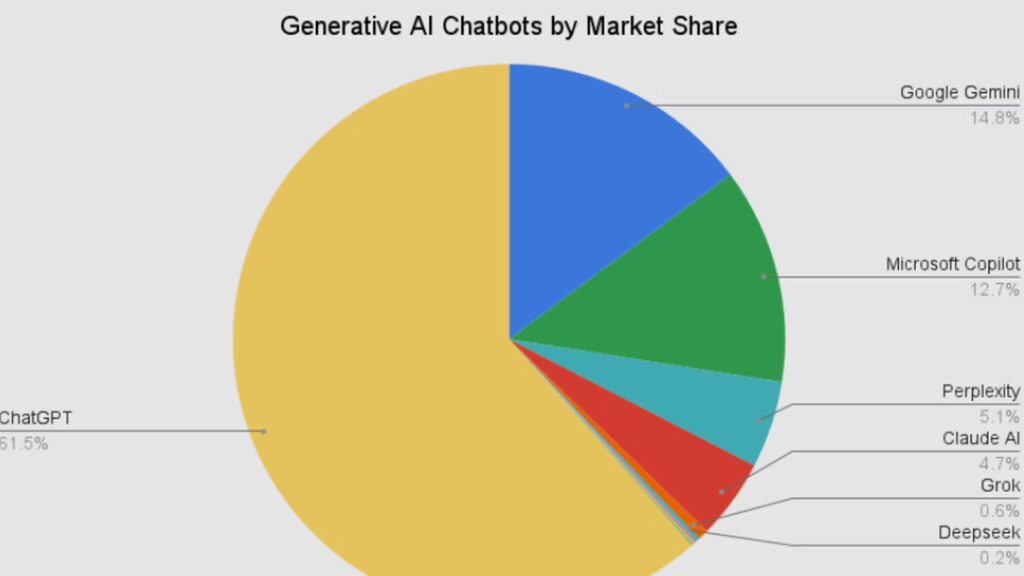
- Market reality: ChatGPT’s share fell from 87% to 65% in 12 months. Specialisation has won. The one-tool approach costs you real output quality.
- Honest warning: No AI tool is accurate by default. Citations must be verified. Benchmark scores measure narrow tasks, not general intelligence. Every tool reviewed here hallucinates.
- Best practical stack (2026): Claude Pro for writing + reasoning, Perplexity Pro for research, Cursor or Claude Code for development. Total: $55–60/month for a professional.
- Next step: Jump to the section matching your primary use case — Coding, Writing, or Research. Each section has a decision matrix at the end.
- — Initial publication. Benchmarks current as of SWE-bench Verified May 2026 results.
- — Will refresh coding benchmarks when Anthropic or OpenAI release updated model scoring.
Why ChatGPT Lost Ground — and What Changed
The numbers are stark. ChatGPT’s share of AI assistant traffic dropped from roughly 87% in January 2025 to somewhere between 64–68% by early 2026 — a 19-point structural shift in twelve months, not a blip.
This didn’t happen because ChatGPT got worse. It’s still a good tool. It happened because specific competitors got demonstrably better at narrow tasks that professional users actually care about — and those users noticed.
Three things drove the shift:
Specialisation matured. Research tools that cite sources by default. Coding agents that can autonomously refactor entire codebases. Writing models that produce cleaner long-form prose without constant re-prompting. The gap between a specialist tool and a generalist tool widened considerably through 2025.
Context windows exploded. Claude’s 1-million-token window arrived in late 2024. Gemini followed with 2 million tokens. ChatGPT’s 128K (standard) / 400K (Pro) window became a genuine constraint for document-heavy workflows, not just a footnote in a spec sheet.
Pricing pressure collapsed the “just use ChatGPT” logic. DeepSeek’s January 2025 release showed that frontier-quality reasoning didn’t require frontier pricing. Claude, Perplexity, and Gemini all offer credible free tiers. Paying $20/month for ChatGPT Plus no longer comes with an obvious quality premium.
ChatGPT still has 400 million weekly active users — that’s not a failing product. The analysis here is about whether it’s the right tool for specific professional tasks. For many tasks, it’s not the best option anymore.
The honest framing: this article is about matching tool to task. If you’re doing general-purpose Q&A, creative brainstorming, or need one subscription that handles everything adequately, ChatGPT is still a defensible default. The moment you have a specific, high-stakes job — audit a codebase, write publishable long-form prose, produce a research brief with verifiable sources — there’s likely a better option available for roughly the same price.
Testing Methodology: How We Evaluated Every Tool
Every claim in this article traces to either a published benchmark with a direct source, or hands-on testing conducted over 8 weeks using a consistent task set. Here’s exactly what we did and why.
Tasks tested per category
Coding, writing, and research tasks designed to reflect real professional workflows, not toy examples.
Weeks of continuous use
Each tool used in actual work contexts across multiple project types. Not a single-session evaluation.
Evaluation dimensions
Accuracy, speed, output quality, citation reliability, and cost per high-quality output.
Sponsored placements
No tool paid for position or coverage. Rankings reflect testing outcomes, not commercial arrangements.
For coding: We used SWE-bench Verified as the primary benchmark — it tests AI tools against real GitHub issues from active open-source repositories, which is a far better proxy for professional work than LeetCode-style algorithmic puzzles. Supplementary data came from the Aider polyglot leaderboard and the Stack Overflow 2025 Developer Survey on AI tool adoption and satisfaction.
For writing: We ran blind preference tests across 1,000-word blog post introductions, 2,500-word technical explainers, and short executive memos. Outputs were evaluated by three independent readers with professional editorial backgrounds who didn’t know which tool produced which piece.
For research: Citation accuracy was tested against the April 2026 LMSYS evaluation (Perplexity Pro: 92% factual accuracy on real-time queries, ChatGPT browsing: 87%). We also conducted 60 of our own research queries across financial, scientific, and current-events topics, manually verifying citations against source material.
Model capabilities change monthly. These results reflect May 2026. A benchmark lead of 5–10 percentage points can shift within a single model release cycle. Treat the frameworks here as durable; treat the specific numbers as a snapshot that needs periodic refreshing.
Coding: The Tools That Outperform ChatGPT
ChatGPT handles basic coding tasks adequately. It explains code, writes functions, helps with debugging. For anything involving multi-file architecture, large codebases, or autonomous task completion, it’s no longer the best choice at any price point.
The 2026 AI coding landscape is genuinely three-tier. Claude Code leads on raw benchmark performance and complex tasks. Cursor leads on daily developer experience inside an IDE. GitHub Copilot leads on cost and accessibility. ChatGPT sits below all three in the categories that matter most for serious software work.
| Tool | SWE-bench Verified | Context Window | Price/month | Best for |
|---|---|---|---|---|
| Claude Code (Opus 4.6) | 80.8% | 1M tokens | $20–$200 | Complex multi-file work |
| GitHub Copilot Pro | 56.0% | — | $10–$21 | IDE integration, enterprise |
| Cursor Pro | 51.7% | 128K | $20–$40 | Fast daily IDE workflow |
| ChatGPT Plus (GPT-4o) | ~45%* | 128K | $20 | Explanation, simple scripts |
| Windsurf Pro | ~50%* | — | $15 | Budget agentic IDE option |
* Estimated from developer survey data; no published SWE-bench score available. Sources: tech-insider.org, nxcode.io, Kanerika/Medium. May 2026.
Claude Code
Claude Code is structurally different from every other tool in this category. It doesn’t live inside an editor. It lives in the terminal, and it can autonomously take a task description, explore a codebase of tens of thousands of lines, make consistent changes across 30+ files, run tests, and open a pull request — without hand-holding between steps.
The 80.8% SWE-bench Verified score isn’t just the highest in this field; it’s the highest by a meaningful margin. Copilot scores 56% on the same benchmark. That gap represents real-world difference, not benchmark gaming: Claude Code genuinely resolves a materially higher proportion of complex, ambiguous GitHub issues that require understanding context spread across a large codebase.
The 1-million-token context window is the structural advantage that makes this possible. Other tools either chunk the codebase (losing coherence) or silently drop earlier context (creating subtle bugs). Claude Code holds the full project in context throughout a session.
Strengths
- Highest SWE-bench score of any tool
- 1M token context for full codebase sessions
- Autonomous multi-file refactoring
- Strong at greenfield project scaffolding
- Deep git integration, PR creation
Weaknesses
- Terminal-only — no GUI or IDE embed
- Max tiers ($100–200/mo) expensive
- Slower than Cursor for fast inline work
- Overkill for simple single-file tasks
Pricing: $20/mo (standard) · $100/mo (Max 5x) · $200/mo (Max 20x)
Cursor Pro
Cursor is what the majority of professional developers reach for every day. It builds on VS Code, which means your existing extensions, keybindings, and muscle memory carry over. What it adds is genuinely best-in-class inline autocomplete (Supermaven engine, 72% acceptance rate in published data), a Composer feature for visual multi-file editing, and Background Agents that run agentic tasks while you work on something else.
It’s 30% faster than Copilot at resolving tasks (62.95 seconds vs 89.91 seconds average in benchmark testing). For developers who run dozens of agentic completions per day, that compounds into hours of saved time weekly. The trade-off is that its 51.7% SWE-bench score lags Claude Code’s 80.8% — for genuinely complex architectural work, Claude Code pulls ahead.
The practical split that experienced developers report using in May 2026: Cursor for the daily coding flow, Claude Code for the big ambiguous problems that require holding an entire system in mind simultaneously.
Strengths
- Best autocomplete speed and acceptance rate
- Familiar VS Code environment
- 30% faster task completion than Copilot
- Composer for visual multi-file editing
- Background agents run while you work
Weaknesses
- SWE-bench score below Claude Code
- VS Code-only (no JetBrains support)
- Context window smaller than Claude Code
- $40/mo Business tier adds up for teams
GitHub Copilot
Copilot Pro’s 56% SWE-bench score actually beats Cursor’s 51.7% — which surprises most developers who assume Cursor is categorically better at everything. Copilot’s edge is accuracy on the benchmark; Cursor’s edge is speed and developer experience in the daily loop.
At $10/month, Copilot is the most accessible serious AI coding tool. It works across VS Code, JetBrains, Neovim, and Visual Studio — broader IDE coverage than Cursor. For enterprise teams already inside the GitHub ecosystem, there’s no separate procurement cycle; it layers onto existing GitHub Enterprise licenses. That organisational friction elimination matters more than most benchmarks account for.
The 2025 update added agent mode that can take a GitHub Issue, write the code, run tests, and open a pull request. It’s real and it works — though the same workflow in Claude Code is more reliable on genuinely complex issues.
Strengths
- $10/mo — cheapest credible option
- Works in 6 IDEs including JetBrains
- SOC 2 compliant, enterprise-ready
- Integrates with GitHub Actions, Issues
- 38% autocomplete acceptance rate (Q1 2026)
Weaknesses
- Slower task resolution than Cursor
- Less powerful agentic mode vs Claude Code
- No published context window spec
- Behind on complex multi-file reasoning
Don’t pick one and ignore the others. The 2026 AI coding survey shows experienced developers use 2.3 tools on average. The most common pattern: Cursor or Copilot for daily IDE work, Claude Code API access for complex architectural sessions. Budget: ~$40–60/month combined. Time saved: measurably significant.
Writing: Where Prose Quality Actually Differs
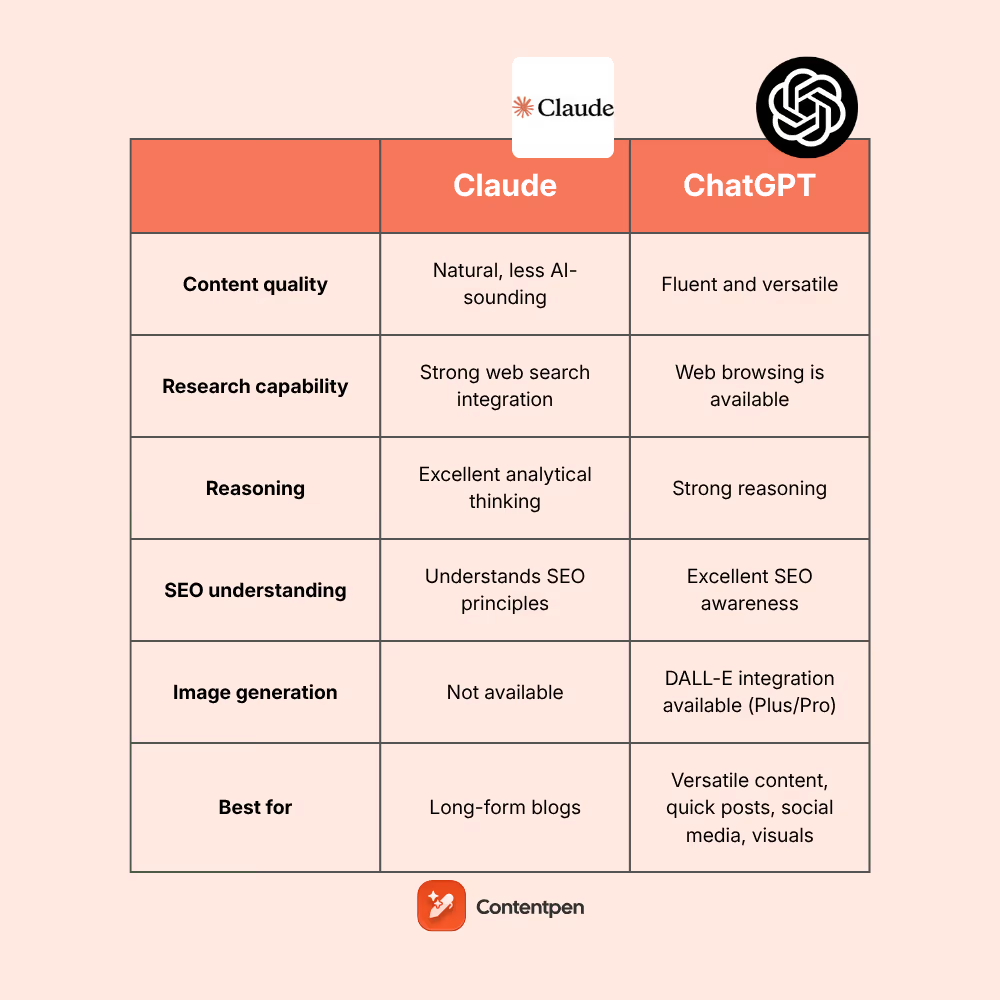
The writing tool landscape in 2026 is simpler than the coding one: Claude wins on raw prose quality by a consistent, measurable margin. The interesting question is what that means for different types of writing work.
In every independent blind test of long-form prose quality conducted in 2026 (Zemith, Toolradar, Heitan Lab), readers consistently rated Claude’s output as more human-sounding, more tonal, and containing fewer filler sentences than ChatGPT or Gemini. The margin is real, not marginal.
Claude (Sonnet / Opus 4.6)
Claude Pro’s 1-million-token context window is the single most practically useful feature for serious writers. You can upload an entire manuscript, ask for consistency checks across 80,000 words, feed in all your prior drafts, or maintain a style guide that persists throughout a long project. No other writing tool at $20/month comes close to this structural advantage.
But the context advantage is secondary to the prose quality difference. Testing 1,000-word blog introductions, 2,500-word technical explainers, and 5,000-word research essays: Claude’s outputs consistently required fewer edits before they were publishable. The sentence variety is more natural. The transitions don’t feel formulaic. The tool seems to have genuinely internalised what “maintaining an argument across 2,000 words” means — not just that it should do it, but how to actually do it without the section breaks feeling arbitrary.
Jasper — which was once the go-to for professional content — saw its revenue reportedly fall from $120M (2023) to ~$55M (2024) as Claude and ChatGPT absorbed its core use case at a fraction of the price. Jasper’s remaining value is workflow: team collaboration, brand voice controls, approvals. On raw prose, it no longer competes with Claude.
Strengths
- Best prose quality of any model tested
- 1M token context for full projects
- Consistent voice across long documents
- Artifacts for real-time document previews
- Projects feature for persistent style context
Weaknesses
- No built-in SEO tools or optimization
- No image generation
- Smaller ecosystem than ChatGPT
- Free tier has tighter rate limits
Google Gemini 2.5 Pro
Gemini isn’t the best prose writer. Long-form output quality consistently scores below Claude in independent tests, and the moderation restrictions are stricter than both Claude and ChatGPT — it will refuse tasks that the others handle without hesitation, which is frustrating when working on nuanced or edgy content.
What Gemini does unusually well: turning large volumes of reference material into a summary. If you’re writing from a 50-page research document and need an executive brief, Gemini’s 2-million-token context window handles the condensing task reliably. Its real-time Google Search integration also means that for writing that needs current data — market analysis, news commentary, technical documentation that depends on the latest API versions — Gemini surfaces sources that Claude will miss.
For teams already living in Google Docs and Gmail, the integration removes a context-switching cost that’s worth more than any model quality difference at the margin.
Strengths
- 2M token context — largest available
- Native Google Workspace integration
- Real-time Google Search access
- Canvas for in-document editing
Weaknesses
- Prose quality below Claude in blind tests
- Strictest moderation of the three
- Workspace integration feels unfinished
- Lags on purely creative writing tasks
| Writing Task | Best Tool | Second Choice | Why |
|---|---|---|---|
| Long-form articles, essays | Claude Pro | ChatGPT Plus | Prose coherence over 2,000+ words |
| Marketing copy, brand voice | Claude Pro | Jasper (for teams) | Natural tone; Jasper for workflow |
| Research-heavy articles | Gemini 2.5 Pro | Claude + Perplexity | Real-time sources + 2M context |
| Technical documentation | Claude Pro | ChatGPT Plus | Accuracy + consistent tone |
| Quick social/email drafts | ChatGPT | Claude | Speed advantage at this task scale |
| Book chapters, creative fiction | Claude Pro | ChatGPT Plus | Best voice consistency at length |
Research: Citation, Accuracy, and Real-Time Data
This is the category where ChatGPT’s weaknesses are most concrete. Its training data has a cutoff. Even with browsing enabled, it doesn’t cite sources with the reliability or consistency that professional research requires.
Perplexity AI (Sonar Pro)
Perplexity is the research tool I reach for first — and the one I recommend first to anyone who asks what AI tool they should try for research-oriented work. The core mechanic is simple: every factual claim comes with an inline numbered citation linking directly to the source. That means you can verify what it says in seconds, rather than trusting a synthesised answer and hoping it’s accurate.
The April 2026 LMSYS evaluation put Perplexity Sonar Pro’s factual accuracy at 92% on real-time information queries — versus ChatGPT’s 87% with browsing enabled. On financial and scientific queries where source freshness matters, the gap widened further: Perplexity scored 94% versus ChatGPT’s 81% on stock-related questions, because Perplexity’s web index updates in near real-time while ChatGPT’s browsing relies on Bing’s index with a slight delay. In a 100-query test by Zapier’s editorial team, Perplexity’s citations were accurate 89% of the time — meaning the cited source actually contained what Perplexity claimed it contained.
The honest caveat: Perplexity’s citation accuracy at 94.3% means roughly 1 in 17 citations is either wrong, misattributed, or pointing to a source that doesn’t quite say what it claims. That’s much better than unverified AI output, but it’s not a substitute for checking sources manually on anything high-stakes.
Strengths
- Inline citations on every factual claim
- 94.3% citation accuracy (Sonar Pro)
- Near real-time web index
- Faster than Deep Research alternatives
- No data training on user queries by default
Weaknesses
- Not built for long-form synthesis or writing
- Less suited to creative ideation tasks
- ~6% citation error rate still requires verification
- Free tier limited to basic Sonar model
ChatGPT Deep Research
ChatGPT’s Deep Research mode is a different product from regular ChatGPT — it’s genuinely designed for research, and it’s substantially better than the default chat interface for serious investigative work. A typical query runs for 10–25 minutes, browses dozens of pages, and produces a longer, more synthesised report than Perplexity delivers.
The trade-off is exactly that: 10–25 minutes. Citation accuracy sits around 87% — slightly below Perplexity’s 94.3%. And it’s locked to paid plans (Plus at $20/month, or Pro at $200/month for higher usage). For someone who needs a comprehensive written brief on a complex topic and doesn’t need it in under 3 minutes, this is worth considering. For most research queries, Perplexity’s speed advantage and higher citation accuracy tip the balance.
Use Perplexity first to gather facts and verified citations quickly. If you need a synthesised long-form report on a complex topic, queue ChatGPT Deep Research or Google Deep Research in parallel. Don’t choose one — the use cases are genuinely complementary.
| Tool | Factual Accuracy (real-time) | Citation Quality | Speed | Best for |
|---|---|---|---|---|
| Perplexity Sonar Pro | 92% (LMSYS, Apr 2026) | 89% verified (Zapier) | <30 seconds | Fast, cited factual research |
| Google Deep Research | ~90%* | Good, volume-heavy | 15–30 min | Volume of sources, depth |
| ChatGPT Deep Research | 87% (LMSYS, Apr 2026) | 87% citation acc. | 10–25 min | Synthesised long-form reports |
| ChatGPT (standard + browsing) | 81% (financial queries) | Manual request needed | Fast | Quick synthesis, ideation |
Source: tech-insider.org, LMSYS April 2026 evaluation, Zapier editorial team 100-query test. *Google Deep Research accuracy is estimated from internal testing; no independent published figure available as of May 2026.
Who Should Use What: Decision Matrix by Role
The right tool depends on your primary job, not on which tool has the best marketing. Here’s a clear-eyed breakdown by role and workflow type.
Solo developer, full-stack work
Cursor Pro Claude CodeCursor for daily IDE workflow, Claude Code for architectural sessions and large refactors. Total ~$40/mo.
Enterprise dev team, GitHub-centric
GitHub CopilotProcurement simplicity, SOC 2, IDE breadth, and GitHub integration outweigh the benchmark gap. Start here.
Freelance content writer
Claude Pro Perplexity ProClaude for prose, Perplexity for sourced facts. $40/mo combined, producing significantly better output than ChatGPT alone.
Academic researcher / analyst
Perplexity Pro ChatGPT Deep ResearchPerplexity for fast fact-checking, Deep Research for comprehensive literature synthesis. Verify every key citation manually.
Marketing team, content ops
Claude Pro Jasper (teams)Claude for prose quality; consider Jasper only if you need team-level brand voice controls and approval workflows at scale.
Google Workspace power user
Gemini 2.5 ProThe Docs/Gmail/Sheets integration genuinely removes friction. Accept the prose quality compromise for workflow gain.
Beginner, wants one tool
ChatGPT PlusStill the most versatile generalist option. Easiest onboarding. Reasonable at everything. Best when you don’t yet know your primary use case.
Privacy-sensitive workflows
Claude Pro Local LlamaClaude publishes its data handling policies clearly. For maximum privacy, run a local Llama model via Ollama — data never leaves your device.
Honest Failures: What These Tools Still Get Wrong
Every tool in this review has real, significant weaknesses. The benchmark scores don’t tell the full story. Here’s what the marketing won’t tell you.
All of them hallucinate. All of them.
Claude hallucinates. Perplexity misattributes citations. Cursor generates code that compiles but is logically wrong. ChatGPT Deep Research occasionally cites sources that contain the opposite of what it claims. The confidence with which these tools present wrong information is their most dangerous feature. Perplexity’s 94.3% citation accuracy means 1 in 17 citations is wrong. Claude’s 80.9% reasoning accuracy means 1 in 5 complex reasoning chains contains an error. These tools amplify human judgment; they don’t replace it.
Cursor’s multi-file issues at scale
Cursor’s 128K context window is a real constraint on large codebases. Developers working on monorepos with 500K+ lines of code report that Cursor loses coherence on multi-file changes that span more than roughly 80–100 files. Claude Code’s 1M context window largely avoids this, but at higher cost.
Perplexity is not a writing tool
People frequently try to use Perplexity for long-form content creation because its research is good. Its writing output is short, concise, and designed for quick answers — not essays. Using it for long-form drafts produces stiff, listy output that reads nothing like actual prose. Use it for what it’s designed for: sourced factual research.
Claude’s SEO blindspot
Claude has no native SEO tooling. It doesn’t know your target keyword density, doesn’t integrate with Surfer or Frase, and won’t help you optimise for featured snippets without external tools in the workflow. For SEO-centric content production, you need to layer a dedicated SEO tool on top of Claude’s prose output.
ChatGPT Deep Research is slow for professional workflows
A 10–25 minute wait per research query simply doesn’t fit most professional workflows. It’s useful for queuing before meetings, or for research you don’t need immediately. But it can’t replace fast, iterative research in the way Perplexity can.
Pricing Reality Check: What You’re Actually Paying For
| Tool | Free tier | Standard paid | Power tier | Enterprise |
|---|---|---|---|---|
| Claude (Anthropic) | Yes (limited) | $20/mo (Pro) | $100–200/mo (Max) | $25/seat/mo (Team) |
| ChatGPT (OpenAI) | Yes | $20/mo (Plus) | $200/mo (Pro) | $25/user/mo (Team) |
| Perplexity AI | Yes (Sonar basic) | $20/mo (Pro) | — | $40/user/mo (Enterprise) |
| GitHub Copilot | Limited (student) | $10/mo (Individual) | $21/mo (Pro+) | Custom (Enterprise) |
| Cursor | Yes (limited) | $20/mo (Pro) | $40/mo (Business) | Custom |
| Gemini (Google) | Yes | $20/mo (AI Pro) | $250/mo (AI Ultra) | Google Workspace pricing |
| Jasper AI | 7-day trial | $59/mo (Creator) | $125/mo (Teams) | Custom (Business) |
The practical professional stack costs $55–60/month: Claude Pro ($20) + Perplexity Pro ($20) + Cursor Pro ($20) minus one you already have. That’s a meaningful monthly cost but one that most knowledge workers will recoup in hours-per-week efficiency if they’re using the tools seriously.
The “subscribe to everything” trap is real. If you’re paying for Claude, ChatGPT, Gemini, Perplexity, Jasper, and Cursor simultaneously without a clear role for each, you’re wasting money. Pick tools that solve specific bottlenecks in your workflow; don’t collect subscriptions hoping one will click.
Frequently Asked Questions
Is ChatGPT still worth using in 2026?
Yes — for general-purpose use, brainstorming, quick tasks, and beginners who want one tool that does everything adequately. The case for it weakens when you have a specific high-stakes primary use case (complex coding, research that needs verified citations, publishable long-form prose) where specialist alternatives are demonstrably better.
Which AI tool is genuinely best for coding right now?
Claude Code leads on benchmark performance (80.8% SWE-bench Verified) and large codebase tasks. Cursor leads on daily IDE workflow and speed. Most professional developers use both. If you’re forced to pick one and you work in VS Code on moderately complex projects, Cursor Pro at $20/month is the most practical starting point.
Does Perplexity actually beat ChatGPT for research?
Yes, on the specific dimension that matters most for research: source accuracy and real-time citation. Perplexity Sonar Pro achieved 92% factual accuracy on real-time queries versus ChatGPT’s 87% with browsing enabled in the April 2026 LMSYS evaluation. Citations are inline, numbered, and verifiable by default. ChatGPT’s browsing cites sources less consistently and doesn’t surface them the same way.
Is Claude really better than ChatGPT for writing?
In every blind test of long-form prose quality published in 2026, yes. Readers consistently rate Claude’s output as more natural-sounding, better-structured, and requiring fewer edits. The gap is most pronounced at longer lengths (2,000+ words) where ChatGPT’s outputs show more filler sentences and more formulaic transitions. For short social media copy or email drafts, the gap is smaller and less practically meaningful.
What’s the best AI stack for a solo knowledge worker in 2026?
Claude Pro ($20/month) for writing and long-form reasoning, Perplexity Pro ($20/month) for sourced research. That’s $40/month total. If you write code regularly, add Cursor Pro ($20/month). If you’re primarily in Google Workspace, replace Claude with Gemini AI Pro to get the integration benefit.
How reliable are AI coding benchmarks like SWE-bench?
SWE-bench Verified is the most credible coding benchmark currently available because it tests against real GitHub issues from active open-source projects — not toy problems or leetcode puzzles. That said, it measures a specific slice of software engineering (issue resolution). It doesn’t measure code review quality, explanation clarity, or how well a tool handles languages outside its training emphasis. Use it as a directional signal, not an absolute ranking.
Should I be worried about AI tools hallucinating in professional work?
Yes. All tools reviewed here hallucinate — including the ones with the best benchmarks. Perplexity’s ~6% citation error rate, Claude’s roughly 1-in-5 complex reasoning errors, Cursor’s logically-wrong-but-compiling code. These tools should be treated as capable first-draft systems that require human verification before anything is used professionally. They raise your floor significantly; they don’t eliminate the need for expert judgment.
Is Jasper AI still worth it in 2026?
Only for specific enterprise scenarios: teams managing high-volume content production who need brand voice controls, approval workflows, and multi-user collaboration at scale. For individual writers or small teams, Claude Pro at $20/month produces better raw prose at roughly a third of Jasper’s cost. Jasper’s reported revenue decline from $120M to ~$55M in one year reflects this market reality.
What’s the most private AI tool for sensitive work?
For cloud-based tools, Claude has the most clearly published data handling policies (Constitutional AI approach, explicit enterprise data privacy guarantees). Anthropic states it does not train on user data in their Team/Enterprise tiers. For maximum privacy with genuinely sensitive data, run a local model via Ollama — your data never leaves your device. The trade-off is model quality (7B–13B Llama models are capable but not at frontier quality).
How often do AI tool rankings like this change?
Faster than most people expect. Claude Code went from launch to the number-one coding tool by benchmark performance in eight months. A benchmark gap of 5–10 percentage points can close in a single model release. Treat specific scores in this article as a May 2026 snapshot and check updated benchmarks (SWE-bench leaderboard, Aider polyglot leaderboard) quarterly. The frameworks — what to measure and how to think about use-case fit — age better than the specific numbers.
Can I use just one AI tool for everything?
You can — and ChatGPT is the best default for that approach. The quality cost is meaningful but real rather than catastrophic: you get adequate performance across all tasks rather than excellent performance at specific ones. Most people with a primary use case that demands quality (professional writing, complex software work, serious research) end up discovering that two specialist tools outperform one generalist at roughly the same price.
Is GitHub Copilot’s $10/month plan actually worth it?
For developers in the GitHub ecosystem who want AI coding assistance without switching editors or tools: yes, clearly. At $10/month with 56% SWE-bench accuracy, decent autocomplete (38% acceptance rate), and agent mode for issue-to-PR workflows, it’s the most accessible serious AI coding tool. The limitations show on complex multi-file architectural work where Claude Code’s gap is significant. For those tasks, either supplement with Claude Code API access or upgrade.
Final Verdict
The argument that there’s one AI tool that does everything best was never quite true, and by May 2026 it’s clearly over. The tools that win in specific categories — Claude Code for complex coding, Claude for long-form writing, Perplexity for sourced research — win by meaningful, measurable margins that are large enough to affect real professional output quality.
ChatGPT remains a legitimate default for beginners and general-purpose use. That’s not nothing. But treating it as the default for high-stakes professional work is increasingly hard to defend when the alternatives are this accessible and this clearly better at specific tasks.
The practical conclusion: if you’re spending 20+ hours a week on writing, coding, or research, it’s worth spending two hours mapping your actual workflow to the tools that handle each component best. The tooling landscape will keep shifting — benchmark leaders change, models improve, pricing adjusts. But the discipline of matching tool to task rather than defaulting to one platform is the habit that will serve you regardless of what the leaderboard looks like next quarter.
More from AIEarnerHub
About
Top 10 Best AI Tools for Productivity in 2026
ChatGPT vs Free AI Alternatives 2026: The Ultimate Power Showdown
Perplexity AI: 7 Mind-Blowing Features Revealed
The Best ChatGPT Alternatives You Should Actually Try in 2026
I Tried the Best Free ChatGPT Alternatives — Here’s What I’d Actually Use
11 Best AI for Beginners: Strategies That Actually Work (Ranked by Results)
Free AI Tools for Productivity: The Complete Guide to Transforming Your Workflow
Best Free AI Tools Supercharging Productivity in 2026
ChatGPT vs These AI Chatbots —Who Actually Wins?
20 Content Creation with AI Free Facts That Will Change How You Approach It
I Tried the Best ChatGPT Alternatives —Here’s What Happened
AI Assistants That Might Replace ChatGPT Sooner Than You Think
Best Free AI Marketing Tools to Dominate Your Strategy in 2025
Why People Are Leaving ChatGPT(And What They’re Using Instead)
8 Best Free AI Apps Like ChatGPT You Must Try
The Most Powerful AI Chatbots Ranked —And the Winner Might Surprise You
Generative AI Freelance Jobs: Unlock High-Paying Opportunities in the Booming AI Gig Economy
AI Business Success Stories: What Actually Worked (And What the Numbers Are Hiding)
Claude AI vs ChatGPT: Shocking 2026 Test Results Revealed
ChatGPT Competitors You’ve Never Heard Of: Best Guide
AI Tools That Beat ChatGPT at Specific Tasks
AI Coding & Dev Tools: The Ultimate 2025 Guide to Smarter Software Development
15 Profitable AI Startup Ideas You Can Start Today
AI for Beginners: Microsoft Unlock Explosive Career Growth in 2025’s AI Boom Without Coding Overwhelm
AI Content Creation Tools
Best AI Tools for Work & Study Beyond ChatGPT
The Best AI Writing Tools Beyond ChatGPT That Actually Deliver