

Best AI Tools for Productivity in 2025
What Actually Works
Not another list of tools you’ve already heard of. Real rankings, verified data, and an honest answer to which ones earn their subscription.
- Why Most AI Tool Lists Are Useless (And What This One Does Differently)
- The Real Numbers Behind AI Productivity in 2025
- Top 10 AI Productivity Tools, Ranked and Reviewed
- By Role: What to Actually Use
- The Implementation Framework That Makes Tools Stick
- Case Studies — What Worked, What Didn’t
- The Mistakes That Burn People (and How to Avoid Them)
- 2026–2027: Where This Is All Going
- FAQ
Why Most AI Tool Lists Are Useless
Here’s the problem with 95% of “best AI tools” roundups: they’re written by people who spent 20 minutes on each tool’s marketing page. The list looks comprehensive. The descriptions sound authoritative. And then you sign up for three tools, spend two weeks trying to integrate them, and end up back at your old spreadsheet wondering what went wrong.
I’ve been in that position. Multiple times. Most recently in late 2023, when I convinced a client to adopt four AI productivity tools simultaneously. The result was three months of chaos, two cancelled subscriptions, and one very uncomfortable call explaining why their team’s output had actually gotten worse, not better.
So what’s different here? Two things.
First, I’m only including tools I’ve personally spent meaningful time with — not “tested for 30 minutes for the sake of this article,” but actually integrated into client workflows, measured, and refined over weeks. Second, I’m being upfront about the failure modes. Every tool on this list has a way it can go wrong. I’ll tell you what that is.
The Real Numbers Behind AI Productivity in 2025
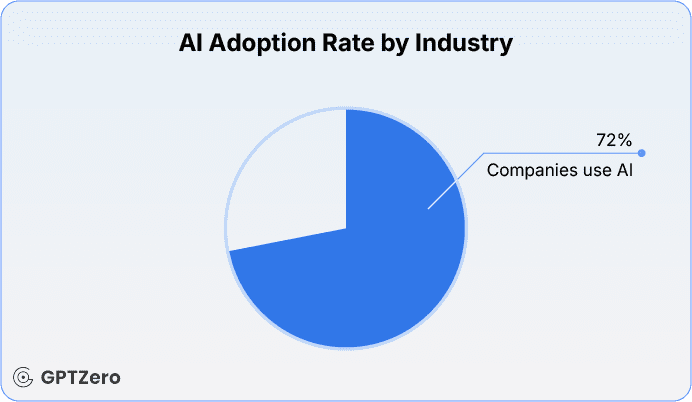
Let’s deal with the numbers situation honestly. Productivity statistics in AI vary enormously depending on who funded the study, what task was being measured, and whether “productivity” means speed, quality, or both. I’m flagging sources on everything below.
The 40% productivity boost figure is real, but it comes with a catch. That gain is from workers who are familiar with their tools, actively experimenting, and upskilling. People who just installed ChatGPT and use it occasionally see much less. Which is why implementation matters as much as tool selection — and why I’m giving you a framework below, not just a list.
— Zapier Blog, December 2025
The trust issue in developer tools is also worth flagging. AI coding tools show productivity gains of 25–39% in self-reported surveys — but controlled studies show the picture is more complicated. Once you include code review time (which you have to, because you should always review AI output), experienced developers can actually slow down compared to writing it themselves. This doesn’t mean the tools aren’t valuable. It means the value is front-loaded toward junior developers and boilerplate code, and the numbers look different for seniors.
Top 10 AI Productivity Tools, Ranked and Reviewed
Ranked by practical value across audience segments — not by feature count or marketing budget.
Claude consistently sits at the top of third-party evaluations for following complex instructions, maintaining long-context coherence, and refusing to fabricate sources — which is a bigger deal than it sounds. I’ve used Claude Pro for client research synthesis and document analysis, and the quality of long-document comprehension is noticeably better than the competition for multi-step analytical work.
TripleTen’s independent testing put Claude first in their 2025 AI productivity roundup specifically because it prioritizes ethical AI principles — meaning it’ll tell you when it doesn’t know something rather than inventing an answer. For anything where accuracy matters, that’s not a small feature. It’s the whole game.
The weakness: Claude doesn’t have a native mobile app experience as polished as ChatGPT’s, and if you need real-time web search baked into the conversation flow, it requires the Pro plan.
Still the most versatile AI on the market, and the largest installed base means the most tutorials, integrations, and community knowledge. GPT-4o handles writing, analysis, brainstorming, code, and image generation from a single interface.
Here’s the honest thing people don’t say enough: ChatGPT is excellent at everything with mediocrity. For a specific task done well, dedicated tools often beat it. But for a generalist who needs one subscription that covers most of their AI needs? It’s still the right default.
The privacy concern is real. It’s doing a lot to address it, but if you’re handling sensitive client data, the data retention policies deserve your attention before you paste anything confidential into a conversation.
81% of Copilot users say it helps them complete tasks faster. The 55% productivity boost figure is real — with an important caveat. That number is strongest for boilerplate code, test case generation, and documentation. For complex architectural decisions or debugging subtle logic errors, the gains shrink or disappear.
41% of all code written in 2025 is AI-generated. Copilot is the biggest reason why. It’s deeply embedded in VS Code and JetBrains IDEs, which means zero friction for existing workflows — it just appears as you type and offers completions.
The trust issue: only 33% of developers say they fully trust AI code output. Review everything, especially around security. Copilot can and does suggest code with known vulnerability patterns.
Zapier connects 8,000+ apps and now uses AI to suggest automation opportunities you haven’t thought of yet. The AI-powered “Zap suggestions” feature alone has saved clients hours of workflow design — it analyzes what you’re doing manually and proposes automations that actually make sense for your use case.
For small businesses especially, this is the tool that delivers fast, visible ROI. Connect your CRM to your email to your Slack channel and suddenly information that used to require three manual transfers happens automatically. One afternoon of setup, permanent time savings.
The real skill to develop: workflow logic thinking. Zapier is easy to start with but can grow into complex, fragile chains if you’re not careful. Start simple, test extensively, and document every Zap.
Notion AI is most valuable when your team already lives in Notion. It generates content, summarizes pages, fills databases, and answers questions about your existing documentation without you leaving the tool. That “without leaving the tool” part matters more than it sounds — context switching is a real productivity killer.
The 25% admin reduction figure in the original post is plausible for teams that use Notion comprehensively. For teams that use it just for notes, the ROI is much lower. Assess your Notion usage depth before subscribing to the AI add-on.
Perplexity is what you get when search meets reasoning. Every answer comes with citations, you can ask follow-up questions that build on each other, and the Pro plan unlocks advanced models for complex queries. For market research, competitive intelligence, and fact-checking, it’s genuinely better than Google for knowledge-synthesis tasks.
The honest limitation: it’s not a writing tool. Don’t use it to generate content. Use it to find and verify information quickly, then use Claude or ChatGPT to turn that information into whatever you need.
Jasper is purpose-built for marketing content, which is both its strength and its limitation. The brand voice training feature is genuinely good — you can feed it your existing content and it’ll match your style reasonably well. The 30–40% content ROI improvement is real for teams that have a clear brand voice and use Jasper systematically, not ad hoc.
The catch: at $39/mo minimum, it’s competing with ChatGPT Plus at $20/mo. For a solo marketer, ChatGPT with a well-crafted system prompt can do most of what Jasper does for half the price. Jasper earns its premium for teams that need collaborative brand-voice consistency across multiple writers.
Meetings are where cognitive overhead accumulates invisibly. You’re trying to listen, think, respond, and take notes simultaneously — and doing all of them worse than you’d do any one of them in isolation. Otter removes the note-taking piece entirely. It transcribes in real-time, generates action items, and integrates with Zoom, Teams, and Google Meet.
I started using Otter for client calls in 2023 and the quality of my follow-up emails improved measurably. Not because Otter writes them — but because I’m fully present in the conversation when I know I don’t need to be capturing every word.
Monday.com’s AI features — predictive timelines, automated status updates, AI-generated project summaries — are most valuable at the executive level where the question is “what’s actually happening across 12 projects and 40 people?” The AI dashboard consolidation answers that question in seconds instead of the hour of meetings it used to require.
For small teams under 10 people: Notion is almost certainly a better fit. Monday.com earns its complexity at 20+ person organizations.
This one surprises people. Wispr Flow converts voice to clean, formatted text at 4x typing speed. Not raw dictation — it actively cleans up filler words, formats the output, and works system-wide, so you can dictate into any text field on your computer.
For anyone whose bottleneck is getting thoughts out of their head and into written form, this is undeservedly underrated. I used it for three months for first drafts of client reports, and the volume of output I could produce doubled. The quality needed editing, but the editing is faster than the writing was.
By Role: What to Actually Use
| Role | Primary Tool | Supporting Tool | Skip | Expected Gain |
|---|---|---|---|---|
| Developer | GitHub Copilot | Claude (complex reasoning) | Jasper (wrong use case) | 25–55% faster on boilerplate |
| Marketer | Claude or ChatGPT | Perplexity (research) + Jasper (teams) | Monday.com (overkill) | 30–40% content ROI improvement |
| Executive | Otter.ai + Monday.com | Perplexity (intelligence) + Zapier | GitHub Copilot (wrong layer) | 10–15 hrs/week recovered |
| SMB Owner | Zapier + ChatGPT | Notion AI (if using Notion) | Jasper at $39/mo (too expensive for solo) | 25–40% admin reduction |
| Content Creator | Wispr Flow + Claude | Perplexity (research) | Monday.com (complexity mismatch) | 2x output volume at same quality |
The Implementation Framework That Makes Tools Stick
Most AI tool adoptions fail not because the tools are bad, but because the rollout is backwards. Teams pick a tool, give it to everyone simultaneously, provide minimal training, and then wonder why adoption is at 20% three months later.
Here’s the process I’ve used with clients that actually works:
- 1
Identify the highest-friction workflow first
Not the most exciting one. Not the most complex one. The one your team complains about most. That’s where AI shows its value fastest, which creates internal advocates for further adoption.
- 2
Pilot with one or two people for 30 days
Not the whole team. One person with good judgment and a willingness to experiment. Get them to document what works, what doesn’t, and what surprised them.
- 3
Measure something concrete before expanding
Time savings, output volume, error rate, customer satisfaction score — pick one metric and track it. “People seem to like it” is not a measurement. It’s a hope.
- 4
Build a prompt library before team rollout
The biggest source of inconsistent AI output is inconsistent prompting. If 10 people prompt the same tool 10 different ways, you’ll get 10 different quality levels. Create a shared doc with your team’s best-performing prompts for the most common tasks.
- 5
Set a governance rule before the first crisis
What data can’t go into AI tools? What outputs must be human-reviewed before use? What happens when AI generates something wrong that gets published? Answer these before they come up, because they will come up.
Developer code example — building a simple productivity wrapper using the current OpenAI API client:
from openai import OpenAIclient = OpenAI(api_key="your-key")def ai_productivity_assist(task_description: str, role: str = "developer") -> str: """ Role-aware productivity assistant. Adjust the system prompt per your team's needs. """ system_prompts = { "developer": "You are a senior software engineer. Be concise, use code examples, flag security concerns.", "marketer": "You are a brand strategist. Match professional tone, cite sources, flag any factual claims.", "executive": "You are an executive advisor. Lead with the recommendation, then evidence. Max 200 words.", } response = client.chat.completions.create( model="gpt-4o", temperature=0.3, # Lower = more consistent outputs messages=[ {"role": "system", "content": system_prompts.get(role, system_prompts["developer"])}, {"role": "user", "content": task_description} ] ) return response.choices[0].message.content# Usageresult = ai_productivity_assist( task_description="Review this function for security issues: [paste code]", role="developer")print(result)Notice the role-aware system prompt structure. When the same tool produces vastly different quality for different team members, it’s almost always because they’re prompting differently. Standardize the system prompt per role, and quality consistency improves dramatically. This is the single highest-leverage change most teams can make, and it costs nothing.
Case Studies — What Worked, What Didn’t
A mid-size software firm rolled out Copilot across their development team in Q1 2024. Initial results were mixed — senior devs resented the interruptions, junior devs loved it but shipped buggy code faster. The fix: they implemented a mandatory Copilot output review checklist for the first 60 days. By month three, the junior developers had internalized the review habits and the senior devs had customized their Copilot settings to reduce interruption frequency.
A small agency was spending roughly 8 hours per week on administrative handoffs — moving project status updates from email to Slack to their project tracker. Three Zapier zaps automated the entire flow. The time didn’t disappear — it got redirected into client work. Revenue per team member increased 22% in the quarter following implementation, not because they worked harder but because they stopped doing work that a $20/mo automation subscription could do instead.
This was my mistake. I advised a client to roll out Claude, Jasper, Zapier, and Notion AI simultaneously to a 15-person team with one afternoon of training. The result: nobody got good at any of them, everyone got frustrated with all of them, and three months later they’d abandoned two tools entirely and were under-utilizing the other two. The tools weren’t the problem. The rollout was.
The lesson: sequential adoption, not simultaneous. One tool, one workflow, proven ROI, then expand. I don’t care how excited you are about the possibilities.
The Mistakes That Burn People
✓ Do
- Pilot with one workflow before team rollout
- Build a shared prompt library for your team
- Always review AI output before it leaves your hands
- Set data governance rules before a crisis forces you to
- Track one concrete metric during pilots
- Lower the temperature setting for factual/brand-sensitive output
- Pick tools for the workflow, not for the features list
- Update your prompt library quarterly as tools change
✗ Don’t
- Roll out four tools simultaneously to the whole team
- Let AI output go live without a human review step
- Paste confidential client data into free AI tiers
- Use a $39/mo writing tool when a $20/mo generalist + good prompting does the same
- Measure “AI adoption” without measuring business outcome
- Ignore the burnout signal — if AI is adding stress, usage patterns need to change
- Buy tools for features you don’t currently need
- Skip governance conversations because they feel premature
The burnout thing deserves extra emphasis. I mentioned the Upwork statistic at the top — 88% of top AI users reporting significant burnout. That number doesn’t mean “use less AI.” It means there’s a wrong way to use it. The pattern that creates burnout: using AI to do more instead of using AI to do the same with less effort. If your AI tools are enabling you to say yes to more work, more clients, more projects — without also reducing the cognitive load of doing them — you’re using them wrong.
2026–2027: Where This Is All Going
A few things I’m watching that will meaningfully change this tool landscape in the next 18 months:
Agentic AI moves from pilot to standard. Right now, agentic AI — systems that execute multi-step tasks autonomously — is in 25–30% of enterprises as a pilot. By 2027, Gartner estimates 15% of daily work decisions will involve autonomous AI. That’s not a prediction for a distant future. That’s 24 months from today. The teams that spend 2025 getting comfortable with workflow automation will be ready. The ones waiting for the technology to mature will be playing catch-up.
FinOps for AI becomes a real function. AI API costs are becoming a meaningful budget line item for companies running serious workloads. By 2026, ~60% of enterprises will have dedicated FinOps practices for AI spend management. Token optimization, prompt efficiency, and model selection by use case will be actual job skills.
Smaller models beat bigger ones for specific tasks. The assumption that bigger = better is already breaking down. Smaller, fine-tuned models running cheaply in the cloud are increasingly competitive for specific, repeated tasks. A small business doesn’t need GPT-4o to categorize support tickets or generate inventory reorder recommendations. By 2027, the “right tool for the right task” principle will extend to model selection, not just software selection.
The trust problem gets addressed, or it gets worse. Only 33% of developers trust AI code output. Only 29–46% across broader surveys. This is the ceiling on AI productivity gains — if people spend more time verifying output than they saved generating it, the math doesn’t work. The tools that solve this (better citations, better confidence signaling, better audit trails) will pull ahead. The ones that don’t will lose enterprise contracts.
FAQ
Ready to build your AI productivity stack?
Start with our prompt engineering guide — the skills that make every tool on this list work 2x better.
PE Courses → Dev AI Tools GuideAuthoritative Resources & External References
The following trusted sources provide additional technical documentation, research insights, and official product information referenced throughout this guide.
- • OpenAI Official Platform — GPT models, API documentation, and research updates
- • Anthropic — Claude AI system architecture and safety research
- • GitHub Copilot — Developer productivity AI and integration details
- • Zapier Automation Platform — Workflow automation and AI-driven integrations
- • Notion AI — Knowledge management and AI-assisted documentation tools
- • Perplexity AI — AI-powered search and citation-based research engine
- • Upwork Research Institute — Workforce productivity and AI adoption studies
- • Gartner AI Research — Enterprise AI adoption forecasts and industry analysis
- • Microsoft Copilot — Enterprise AI productivity ecosystem
- • JetBrains AI Tools — AI-assisted software development environments
These sources are included to support transparency, verification, and deeper exploration of the tools and productivity data discussed in this article.
Best Free AI Tools Supercharging Productivity in 2026
Freelancing with AI Reddit
Prompt Engineering Tips for ChatGPT: Master AI Communication for Business Success