

I Tried the Best Free ChatGPT Alternatives — Here’s What I’d Actually Use
Six weeks, eight tools, dozens of prompts across writing, coding, research, and reasoning. The honest results — including the tools I stopped using.
TL;DR — What You Need to Know in 2 Minutes
- The core problem: ChatGPT’s free tier now caps you at roughly 10 messages per 5 hours on its flagship model. In a real workday, that runs out before lunch. But the free alternatives have gotten genuinely good — some are better than ChatGPT on specific tasks.
- Best overall free option: Claude (Anthropic) wins for writing quality, long-document analysis, and nuanced reasoning. The free tier gives you Claude Sonnet 4.6 with a 200K token context window — exceptional for a no-cost tier.
- Best for research with citations: Perplexity AI. Nothing else structures sourced answers as well. The free plan covers most light-to-medium research needs without payment.
- Best truly unlimited free option: DeepSeek at chat.deepseek.com — no visible message cap, strong reasoning, and particularly capable at coding and structured tasks. The privacy tradeoffs are real and covered below.
- Best for Google Workspace users: Gemini, without question. It plugs into Gmail, Docs, and Drive in ways no other tool does on the free tier.
- Honest warning: Free tiers have limits, throttles, and model downgrades during peak hours that paid plans don’t. For mission-critical or high-volume work, none of these fully replace a paid subscription — but for most everyday tasks, they’re more than sufficient.
- What I personally use: Claude for writing and analysis, Perplexity for fact-checking, DeepSeek for technical reasoning when I’ve hit Claude’s daily limit.
Why I Ran This Test — And Why the Market Has Changed
I want to be direct about something before we get into individual tools: the free AI chatbot market in 2026 is categorically different from what it was two years ago. This isn’t incremental improvement — it’s a structural shift.
When I started seriously testing AI tools in 2024, ChatGPT was so far ahead of the alternatives on the free tier that recommending anything else felt slightly dishonest. That’s no longer true. The gap has compressed dramatically, and in several specific areas — long-context reasoning, research with citations, coding assistance — the free alternatives aren’t just close. Some are better.
The specific prompt that pushed me to do this systematically: I was in the middle of analyzing a 90-page industry report when ChatGPT’s free tier kicked me out with a usage warning. Ten messages every five hours is unworkable for any real research session. I switched to Claude, which handled the entire document without complaint, and realized I’d been paying $20/month largely out of habit.
So I spent six weeks testing eight tools systematically. I used each one for real work — writing deliverables, debugging code, summarizing long documents, researching factual questions — not synthetic benchmarks. Below is what I found.
Testing Methodology: How I Scored Each Tool
Every tool was tested across the same five task categories over the course of six weeks (April–May 2026), using the free tier only. No API access, no paid plans. I scored each dimension 1–10.
Writing Quality
Drafting professional emails, editing paragraphs for tone, long-form article writing, creative tasks. Evaluated on naturalness, coherence, and whether output needed significant editing.
Reasoning & Analysis
Multi-step logic problems, comparative analysis, argument critique, document summarization at 50K+ tokens. Evaluated on accuracy and depth of reasoning.
Coding Assistance
Writing new functions, debugging existing code, explaining unfamiliar APIs. Tested in Python and JavaScript primarily, with some SQL. Evaluated on correctness and explanatory quality.
Research & Factual Accuracy
Questions requiring current information, source citation, fact-checking. Evaluated on accuracy, recency, and citation quality where applicable.
Free Tier Generosity
How quickly the free tier runs out in a real workday. Message limits, model quality at the free tier, throttling behavior under load.
The 8 Tools, Evaluated Honestly
Claude Best Overall
I’ll lead with the tool I use most, and the one I think deserves the top spot for most people doing substantive knowledge work. Claude’s free tier runs on Sonnet 4.6, which as of May 2026 is Anthropic’s mid-tier model — sitting below Opus 4.7, but still comfortably ahead of most alternatives on writing and long-document tasks.
The 200,000-token context window on the free tier is the feature that keeps pulling me back. I’ve fed it entire contract drafts, multi-chapter research papers, and lengthy codebases, and it holds the full context throughout the conversation without the “I see you’ve mentioned earlier…” type of degradation you get with models hitting their limits. That’s not a small thing when you’re doing serious document analysis.
Writing quality is where Claude genuinely separates from the field. The prose it produces has a naturalistic cadence that other models rarely match. It doesn’t pad sentences with corporate filler, and when asked to match a specific voice or style, it actually does it rather than approximating it. A recent TechTudo benchmark from early 2026 rated Claude Sonnet 4.6 highest for prose quality among the three dominant free chatbots — consistent with my own testing.
The honest limitation: the free tier imposes daily usage limits. I’ve never seen a precise message count published — Anthropic is deliberately opaque about it — but in heavy-use sessions, I hit the ceiling. When that happens, the experience isn’t graceful. You get a cooldown period with no clear indication of when it resets. If you’re working at high volume, Claude’s free tier will frustrate you by mid-afternoon.
What Works
- 200K context window — genuinely rare on a free tier
- Best prose quality of any tested tool, consistent
- Rarely hallucinates on factual tasks when data is provided
- Handles complex multi-step instructions without losing the thread
- Strong at nuanced tasks: tone-matching, argument critique, legal text review
Real Problems
- No web search on the free tier — can’t verify current facts
- Opaque daily limits; no clear countdown before cutoff
- Can be over-cautious on edge-case requests
- No image generation
- Slower than DeepSeek or Gemini on comparable tasks
Google Gemini Runner-Up
Gemini’s position in this ranking depends heavily on whether you’re already in Google’s ecosystem. If you use Gmail, Docs, or Drive regularly — and the majority of people do — Gemini has an integration advantage that no other tool on this list can touch. It can search your emails, reference your Drive documents, and carry context across Workspace apps, all on the free tier. That’s a meaningful capability, not a marketing bullet point.
The model quality itself is solid. Gemini 3 Pro on the free tier sits behind Gemini AI Pro (the paid tier) but performs competently on reasoning, coding, and general-purpose tasks. The context window extends to 1M tokens, though in practice the free tier experiences throttling at high loads. On the GPQA Diamond scientific reasoning benchmark, Gemini 3.1 Pro (the paid API tier) scores 94.3% — comfortably ahead of comparable competitors. The free consumer tier doesn’t fully benefit from those numbers, but the underlying model quality filters through.
Where Gemini genuinely struggles, at least in my testing, is writing quality. It produces competent, well-structured prose, but it leans formal and slightly mechanical in a way that Claude doesn’t. For business writing that needs to sound human, I find myself editing Gemini output more heavily than Claude output. It’s not bad — it’s just not as polished.
The multimodal capabilities (image understanding, video analysis) are a real differentiator on the free tier. I used it to analyze diagrams and chart images in a way that would have required separate tools otherwise. That practical utility matters.
What Works
- Deep Google Workspace integration (Gmail, Docs, Drive)
- Real-time web search built in on free tier
- Strong multimodal: images, video understanding
- Competitive reasoning and coding performance
- Image generation included (Imagen 3)
Real Problems
- Prose quality a step below Claude’s — more mechanical
- Throttles under heavy load on free tier
- Google’s data usage policies are broad; conversations inform future model training
- Can produce confidently incorrect answers on obscure factual questions
DeepSeek Best Unlimited Free
DeepSeek is the most complicated tool on this list to recommend, and I want to be careful to be accurate rather than alarmist in either direction.
On raw capability for technical tasks: it’s exceptional, and the free chat interface imposes no visible usage cap. In my testing, I ran multi-hour coding sessions, worked through complex math problems, and did structured data analysis without hitting any limit. For developers or technical users who consume AI assistance at high volumes, that unlimited availability is genuinely valuable. May 2026 independent benchmarks place DeepSeek V4 Pro at Tier A for coding quality — a significant result for a model accessible at no cost.
The privacy reality is harder to navigate. DeepSeek is a Chinese company subject to Chinese data law, which means the state can access user data without the kind of legal safeguards that apply to US or EU companies. DeepSeek’s privacy policy permits broad data collection. For personal projects and non-sensitive technical work, this may be an acceptable tradeoff — but for anything involving confidential business information, client data, proprietary code, or sensitive research, it isn’t. I use DeepSeek for personal coding experiments. I don’t use it for client work.
Writing quality is noticeably below Claude and competitive with mid-tier Gemini. For reasoning-heavy structured tasks — debugging, math, step-by-step analysis — it’s strong. For creative writing or prose that needs personality, it’s functional but flat.
What Works
- No meaningful usage cap on the free web interface
- Best free-tier coding assistance tested
- Strong structured reasoning — math, logic, step-by-step analysis
- Open-weight model: self-hostable for complete privacy
- Ultra-low API pricing ($0.14/M input tokens for V4 Flash)
Real Problems
- China-based data jurisdiction — real legal and confidentiality risk
- Prose quality lags behind Claude significantly
- Can give outdated information on rapidly moving topics
- No image generation or multimodal capability on free tier
- Periodic server outages during high-demand periods
Perplexity AI Best for Research
Perplexity occupies a category of its own on this list because it’s not really an AI chatbot in the same sense as Claude or Gemini. It’s better described as a conversational research engine. Every answer includes inline citations. You can verify the source of each claim. The system searches the live web before responding.
That distinction matters more than it sounds. I’ve used Perplexity to fact-check claims in real-time during calls, research fast-moving news topics, and verify technical specifications — tasks where a general chatbot’s static training data would give me outdated or unverifiable information. For these use cases, it has no real competitor on the free tier.
The free plan provides unlimited basic searches with a rotating selection of underlying models. You don’t control which model processes your query on the free tier — the system chooses. That’s a real limitation for heavy users, but for light-to-moderate research, it doesn’t matter much in practice. Where it does matter: the advanced “Pro Search” mode (which does deeper multi-source synthesis) is limited on the free tier. For casual research questions, the standard mode is usually sufficient.
One thing I want to flag explicitly: Perplexity’s privacy policy is aggressive. The company uses conversation data for model training, even on paid plans. If you’re researching sensitive personal or business topics, that’s worth knowing before you type anything you wouldn’t want recorded.
What Works
- Every answer cites its sources — verifiable in real time
- Live web access on the free tier, not just training data
- Works without account (basic level)
- Best tool tested for fast factual research and current events
- Clean, scannable answer format for quick consumption
Real Problems
- Not a writing tool — doesn’t produce good long-form content
- Pro Search mode rationed on the free tier
- Aggressive data usage policy, including for training
- Answers can feel shallow on highly technical subjects
- Citation quality varies — some sources are low quality
Microsoft Copilot Solid for Microsoft Users
Copilot’s main argument is that it runs on OpenAI’s GPT family under the hood — meaning you’re getting access to a close relative of ChatGPT, free, through Microsoft’s interface. The free tier is more generous than people give it credit for: Microsoft recently extended unlimited free access to its Voice and Think Deeper features, the latter powered by OpenAI’s o1 reasoning model. That’s meaningful access to frontier-tier reasoning without a subscription.
Web search integration through Bing is seamless — arguably better implemented than Gemini’s web search in terms of result quality for English-language queries. The image generation (via DALL-E 3 / GPT Image) is included on the free tier with 15 fast “boost” credits per day and unlimited slower generation after that. For users who need image generation and don’t want to pay, this is the strongest free option.
The limitations cluster around inconsistency. Copilot’s session length is shorter than competitors, and the reasoning quality varies noticeably between sessions in a way that suggests load-based model switching on Microsoft’s backend. On complex reasoning tasks, I got brilliant responses and then mediocre ones to near-identical prompts, 20 minutes apart. That’s frustrating if you’re relying on it for serious work.
Microsoft 365 integration — the thing that would make Copilot genuinely transformative — requires the paid Copilot Pro or Microsoft 365 Copilot plan. The free tier doesn’t touch your Word documents or Outlook emails in any meaningful way.
What Works
- Powered by GPT-5 family — closest free alternative to actual ChatGPT
- Free image generation (DALL-E / GPT Image, 15 fast credits/day)
- Strong Bing web search integration
- Voice mode and Think Deeper now free and unlimited
- No login needed for basic queries (though limited)
Real Problems
- Inconsistent quality between sessions — model switching suspected
- Microsoft 365 integration locked behind paid plans
- Session length limits in Creative mode (~15 turns)
- UI can feel cluttered and distracted compared to Claude or Gemini
Mistral Le Chat Best for EU Privacy
Mistral doesn’t get enough serious attention in English-language tech coverage, partly because it’s a French company competing against the marketing firepower of Google and OpenAI. That’s a mistake. Le Chat is a capable tool, and for users to whom EU data protection standards matter — whether for GDPR compliance, professional obligation, or personal principle — it’s the only major free chatbot that operates under European data law by design.
By default, Mistral doesn’t use your conversations to train future models. That’s a meaningful policy distinction from Google, OpenAI, and Perplexity. For freelancers handling client work, legal professionals, healthcare-adjacent users, or anyone operating in regulated industries in Europe, this policy matters.
The writing quality is competitive with mid-tier Claude for structured tasks — professional emails, summaries, explanations. It lags behind Claude on creative writing and anything requiring strong stylistic control. Multilingual capability is genuinely impressive: it handles French, German, Spanish, Italian, Arabic, and a range of other languages more naturally than ChatGPT, which is relevant for non-English users. Mistral Large 3 (which powers the premium tier) supports up to 256K tokens of context and has solid function-calling support — features that trickle down partially to the free tier experience.
The free tier is among the most generous tested: no credit card, no hard message cap in typical use, fast response times. The Pro plan at $14.99/month is the cheapest premium tier among major competitors.
What Works
- GDPR-compliant by architecture, EU servers
- Conversations not used for training by default
- Strong multilingual capability, especially European languages
- Generous free tier — no card, no strict cap in normal use
- Fast response times; cleaner UI than Copilot
Real Problems
- Smaller ecosystem than US giants — fewer integrations
- Reasoning depth below Claude and Gemini on complex tasks
- Limited image generation on free tier
- Less known = less community support, fewer tutorials
Qwen (Alibaba) Underrated Free Option
Qwen is almost certainly underused by Western audiences, and the performance data from 2026 benchmarks suggests that’s a mistake — at least for technical tasks. The free tier gives you access to Qwen3 Max, Alibaba’s flagship model, which on the AIME 2025 math benchmark matched ChatGPT 5.2 Thinking — a model that requires a paid OpenAI subscription. Getting that level of mathematical reasoning for free is genuinely unusual.
The image editing capability deserves specific mention. Qwen’s layered image editing (Qwen-Image-Layered) allows genuinely non-destructive edits in a way that outperforms ChatGPT’s image editing in my testing — specifically for iterative changes where maintaining consistency across multiple edits matters.
The same data jurisdiction caveat that applies to DeepSeek applies here. Qwen is an Alibaba product subject to Chinese data law. For personal, non-sensitive use, this is an informed tradeoff. For professional or confidential work, it’s not appropriate without self-hosting. The open-weight versions of Qwen models are available for self-hosting, which removes the jurisdiction concern entirely.
Writing quality in English is capable but noticeably less natural than Claude or Gemini. For English-language prose that will be read by native speakers, you’ll spend more time editing Qwen output. For technical and mathematical tasks, that trade-off is often worth making.
What Works
- Qwen3 Max free — frontier-tier math and reasoning at no cost
- Image editing quality surpasses most competitors on the free tier
- Open-weight model available for self-hosting
- Strong performance on structured and technical tasks
- 1M context window on premium models
Real Problems
- Chinese data jurisdiction — same privacy concerns as DeepSeek
- English prose quality lags behind Western models
- Less polished consumer interface than competitors
- Smaller support community in English-speaking markets
HuggingChat Best for Open-Source Transparency
HuggingChat is the tool I’d recommend to someone who cares specifically about transparency, open-source AI, or model-level flexibility. It runs on open-weight models — Llama, Mistral, Qwen, and others — and lets you switch between them within the same interface. More importantly, the platform itself is open-source. You can inspect how it works, which is a meaningful distinction in an industry where most tools are black boxes.
In 2026, HuggingChat introduced intelligent model routing — automatically selecting the most appropriate open-source model for a given query type. That’s a practical improvement that reduces the friction of choosing manually. The platform hosts over 1 million models on the broader Hugging Face ecosystem, and new releases typically appear in HuggingChat within days of their public release — faster than any commercial chatbot platform updates its underlying model.
The raw output quality on most tasks sits below Claude and Gemini, though the gap has narrowed significantly as open-source models have improved. The best open-weight models available through HuggingChat — Llama 4, Qwen3, Mistral Large 3 — are now competitive with ChatGPT’s free tier for a wide range of everyday tasks. Where HuggingChat structurally lags is on server reliability: it can be slow or unavailable during peak load, and as a community-supported platform, uptime is less guaranteed than commercial alternatives.
No account is required to start a conversation. Conversations aren’t used for commercial training (Hugging Face is explicit about this in its privacy documentation). For researchers exploring AI behavior, developers testing model outputs, or technically minded users who want maximum flexibility, it’s genuinely useful.
What Works
- Fully open-source platform — maximum transparency
- No account needed, no usage cap in standard use
- Switch between multiple open models in one interface
- New open-source models appear within days of release
- Privacy-respecting: conversations not used for commercial training
Real Problems
- Performance degrades under server load — reliability is not guaranteed
- Output quality below commercial frontrunners on complex tasks
- Less polished UX than Claude or Gemini
- No integrated web search
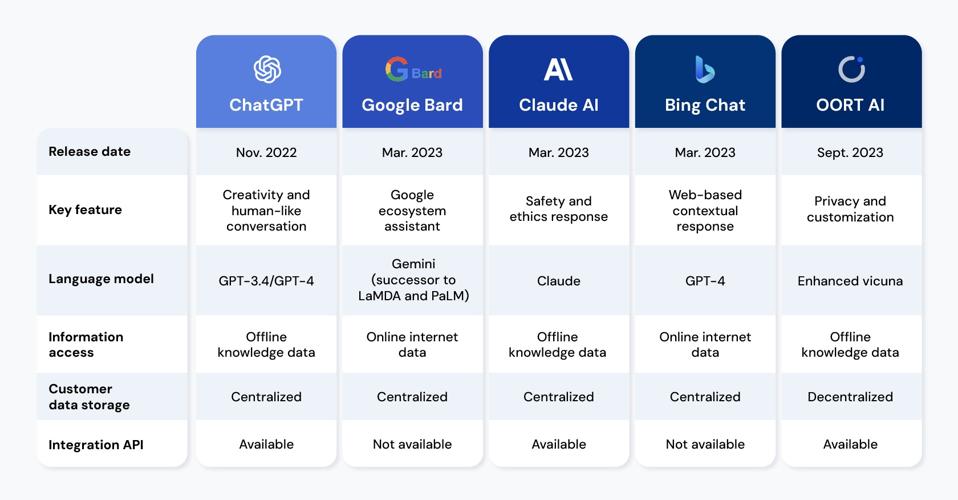
Master Comparison Table
Every tool scored across five dimensions. Scores reflect personal testing on the free tier only, April–May 2026.
| Tool | Writing | Reasoning | Coding | Research | Free Tier | Overall | Best For | Privacy Risk |
|---|---|---|---|---|---|---|---|---|
| Claude (Anthropic) | 9.2 | 8.8 | 8.5 | 7.0 | 7.5 | 8.6 ★ | Writing, analysis, long docs | Low (US, Anthropic) |
| Google Gemini | 7.8 | 8.4 | 8.2 | 8.5 | 8.0 | 8.2 | Google Workspace, multimodal | Medium (Google trains on data) |
| DeepSeek | 7.2 | 8.6 | 9.0 | 7.0 | 9.5 | 8.3 | Coding, unlimited use | High (Chinese jurisdiction) |
| Perplexity AI | 6.5 | 7.5 | 6.8 | 9.5 | 8.2 | 7.7 | Research with citations | Medium (trains on user data) |
| Microsoft Copilot | 7.8 | 7.9 | 7.5 | 8.0 | 7.8 | 7.8 | ChatGPT-adjacent, image gen | Low-medium (US, Microsoft) |
| Mistral Le Chat | 7.5 | 7.4 | 7.3 | 6.8 | 8.8 | 7.6 | EU privacy, multilingual | Very Low (EU/GDPR) |
| Qwen (Alibaba) | 7.0 | 8.8 | 8.5 | 6.5 | 8.5 | 7.9 | STEM, math, image editing | High (Chinese jurisdiction) |
| HuggingChat | 7.2 | 7.5 | 7.4 | 6.5 | 9.2 | 7.5 | Open-source, transparency | Very Low (open-source) |
Which Tool Should You Pick? Use-Case Decision Matrix
Stop trying to find one tool that does everything. The right answer in 2026 is almost always a stack — two or three tools, each doing what it does best. Here’s how to match tool to task:
The Free AI Stack I Actually Run
I want to be concrete rather than leaving you with eight options and a shrug. Here’s the exact setup I’ve settled on after six weeks of testing:
Primary tool: Claude. It handles the large majority of my daily work — drafting, editing, document analysis, reasoning through complex decisions. The free tier is generous enough for moderate daily use. When I hit the limit (usually mid-to-late afternoon on heavy days), I switch.
Overflow + coding: DeepSeek. When Claude’s daily limit is hit and I have technical tasks queued, DeepSeek has no cap. I never use it for client work or anything confidential — that’s a firm rule. For personal scripting, debugging side projects, or working through algorithmic problems, it handles the load cleanly.
Research verification: Perplexity. Any factual claim that matters gets run through Perplexity before it gets published or used in a deliverable. The citation structure means I can verify sources in 20 seconds rather than running a separate search. It’s become a habit rather than an extra step.
That’s it. Three tools. The matrix above covers the edge cases — image generation goes to Copilot, GDPR-sensitive client work would route to Mistral, model comparison experiments to HuggingChat. But for 90% of my workdays, Claude + DeepSeek + Perplexity is the stack.
Privacy Reality Check
The free tier of any AI tool is not privacy-neutral. These companies are offering substantial computing resources at no charge, and they recoup that cost through data. It’s worth being clear about what that means in practice before you type anything sensitive into any chatbot.
The spectrum runs roughly as follows, from highest to lowest risk:
Highest concern: DeepSeek and Qwen operate under Chinese law, which requires companies to cooperate with state intelligence requests. This isn’t a theoretical risk — it’s a legal structure. If the data is on their servers, it is potentially accessible to Chinese authorities without the procedural safeguards that apply in the US or EU. Use these tools only for work you’d be comfortable making public.
Moderate concern: Perplexity explicitly uses conversation data for model training across all plans. Google and Microsoft train on user data with opt-out options that are non-trivial to find and verify. Anthropic (Claude) states it does not train on user conversations by default on the free tier, though it does review samples for safety purposes. Read the current privacy policy of any tool you use for sensitive work — these policies update regularly.
Lowest concern: Mistral (EU law, no-training default), HuggingChat (open-source, explicit non-commercial data use policy), and self-hosted open-weight models (no data leaves your machine). For genuinely sensitive professional work, self-hosting is the only approach that offers real guarantees.
Frequently Asked Questions
Is there a truly unlimited free ChatGPT alternative in 2026?
DeepSeek and Meta AI both run without visible message caps on their free tiers — the closest to genuinely unlimited available in 2026. HuggingChat imposes no hard limit either but can slow significantly under server load. The tradeoff for DeepSeek is data jurisdiction (Chinese servers); Meta AI collects data broadly for training. Unlimited doesn’t mean consequence-free.
Which free AI is best for writing and content creation?
Claude, without serious competition in my testing. The prose quality is noticeably more natural than any other free-tier tool. The 200K context window means it can handle full-length drafts, maintain a consistent voice across a long piece, and handle iterative revisions without losing context. For creative or professional writing, the gap between Claude and the next-best free option is meaningful.
Can I use these free AI tools for professional client work?
Legally, yes — Claude, Gemini, Copilot, and Mistral all permit professional use on their free tiers. Practically, the limits are: (a) daily usage caps may interrupt workflow in heavy-use sessions, (b) data privacy policies vary and may not meet your professional obligations, especially for legally privileged or regulated data. Mistral is the strongest choice for EU-based professional work due to GDPR compliance and no-training defaults. Check the current Terms of Service for any tool before using it with client data.
How does DeepSeek compare to Claude for coding in 2026?
DeepSeek V4 scores higher on coding benchmarks in May 2026 third-party testing, and in my own testing it produced fewer errors on complex multi-file debugging tasks. Claude is stronger on explaining code clearly and generating well-documented, readable code rather than just functional code. For pure debugging and algorithmic tasks, DeepSeek edges ahead. For code that needs to be maintained and explained to teammates, Claude’s output quality is more practical. The privacy difference — US Anthropic vs. Chinese jurisdiction DeepSeek — is a material factor for professional codebases.
Is Perplexity actually free? What are the real limits?
The standard (free) tier provides unlimited basic searches with automatic model selection, search history, and limited file uploads (5MB per file, a few files per day). The limitation is that the advanced “Pro Search” mode — which does deeper multi-source synthesis — is rationed. For light-to-moderate research, the free tier covers most needs. For heavy academic or professional research use, you’ll notice the Pro Search cap. The paid plan at $20/month removes the cap and adds access to premium models including Claude and GPT-5 class models.
Can I replace ChatGPT Plus ($20/month) with free alternatives?
For most everyday knowledge workers, yes. The combination of Claude (writing, analysis), Perplexity (research), and DeepSeek or Copilot (coding, overflow capacity) covers what most people use ChatGPT Plus for. What you lose: ChatGPT’s broader plugin ecosystem, more polished mobile voice mode, and the consistency of a single interface. What you gain: specialization — each free tool is better at its specific task than ChatGPT is as a generalist. The honest answer is that paying $20/month out of habit is hard to justify in 2026.
Is Gemini’s free tier better than the ChatGPT free tier?
For most tasks, yes — particularly on context window size and web search. Gemini’s free tier context window (1M tokens) dwarfs what ChatGPT’s free tier provides, and built-in Bing-level web search is included. ChatGPT free tier now caps flagship model access at 10 messages per 5 hours. For Google Workspace users specifically, Gemini is a clear win on the free tier. For writing quality and long-form reasoning, Claude is superior to both.
What’s the safest free AI chatbot for private data?
Among cloud tools: Mistral Le Chat. It operates under EU data protection law, doesn’t use your conversations for training by default, and the company is transparent about its data handling. For maximum privacy with no data leaving your device, self-hosting an open-weight model via Ollama or LM Studio (Llama, Qwen, Mistral) is the only approach that provides full control. DuckDuckGo AI Chat offers anonymous access to Claude and GPT mini with no conversation logging — useful for one-off sensitive queries without an account.
Should I be worried about using DeepSeek or Qwen?
The concern is real but depends entirely on what you’re using them for. For personal projects, hobby coding, math problems, and anything you’d be comfortable making public: the privacy risk is likely acceptable if you find the capability valuable. For client work, proprietary code, personal financial or health information, or legally sensitive content: no, these tools should not be used in their cloud form. The open-weight versions of both DeepSeek and Qwen can be self-hosted, which eliminates the data jurisdiction concern entirely.
Which free AI chatbot is best for non-English speakers?
Mistral Le Chat for European languages — it handles French, German, Spanish, Italian, Portuguese, and others more naturally than US-made tools. Qwen for Asian languages, particularly Chinese, Japanese, and Korean. Gemini has broad multilingual support backed by Google Translate infrastructure. Claude handles most major languages capably but is most polished in English.
How often do free tier limits change?
Frequently. Free tier policies have shifted multiple times across all platforms in the past 12 months, typically becoming more restrictive as costs rise or more generous as competition intensifies. Claude, Gemini, and Copilot have all adjusted their free tiers in 2025–2026. Treat any specific limit you read — including in this article — as current as of its publication date, and check the platform directly for the current terms before making workflow decisions.
Is HuggingChat a serious option or just for developers?
It’s genuinely useful for non-developers who want model variety and transparency, but the UX is less polished than Claude or Gemini. The practical limitation for most users is reliability — it slows or becomes unavailable under heavy load. For developers and AI researchers comparing model behavior, it’s excellent. For everyday users who want reliability and consistent output quality, Claude or Gemini is a better starting point.
Final Verdict
After six weeks of testing, the clearest finding is this: the free AI landscape in 2026 is legitimately good. Not “good enough if you’re on a budget” — genuinely good. Claude’s free tier produces writing that rivals professional editors. DeepSeek’s free chat interface has no usage cap and scores at Tier A on independent coding benchmarks. Perplexity has made cited, sourced research a feature that any free-tier user can access daily. The argument for paying $20/month for ChatGPT Plus has to be more specific and more justified than it was 18 months ago.
The three things I’d leave you with:
First, stop looking for one tool. The one-tool-fits-everything era ended. The right setup is a small stack of two or three tools, each dominant in its lane. Claude + Perplexity + DeepSeek (or Copilot if you’re Microsoft-oriented) covers the majority of professional knowledge work without touching a credit card.
Second, take privacy seriously — particularly with Chinese-hosted tools. The capability is real, but so is the data jurisdiction risk. Know what you’re using each tool for before you type the first character.
Third, these free tiers will change. The platforms are competing intensely right now, which is what’s producing this unusual moment of generosity. Lock in your workflows while the free access is as broad as it currently is, and be prepared to adapt.
Changelog: v1.0 — May 25, 2026. Initial publication. Tools tested: Claude Sonnet 4.6, Google Gemini 3 Pro (free), DeepSeek V4 (chat), Perplexity AI (standard), Microsoft Copilot (free), Mistral Le Chat (free), Qwen3 Max (free), HuggingChat. Testing period: April 7 – May 22, 2026.
More From AIEarnerHub
AI Changed SEO in 2026: What 40 Tools Reveal About the New Rules
I Tried the Best ChatGPT Alternatives —Here’s What Happened
ChatGPT Competitors You’ve Never Heard Of: Best Guide
FAQ
ChatGPT vs Free AI Alternatives 2026: The Ultimate Power Showdown
Gallery