
Free AI SEO Writing Tools That Actually Rank: The 2026 Stack Tested on Real Sites
12 tools. 90 days of real testing. One systematic workflow that delivers ~80% of premium-tool results at roughly 5% of the cost — and a framework nobody else is talking about yet.
The short version
- Most free AI tools help you write faster, not rank higher. Different problem.
- The tools that actually move rankings focus on research, structure, and optimization — not word count.
- This guide gives you the exact Monday–Friday workflow across 12 tested tools — and introduces the Free Tool ROI Triangle framework for picking the right tool every time.
- GEO (AI Overviews + AI Mode) tactics are baked in throughout — because rankings in 2026 aren’t just blue links anymore.
Why most free AI content fails — and what’s actually changed in 2026
Let me be honest about something that most tool roundups skip: the problem with free AI writing tools isn’t that they’re bad. It’s that people use them for the wrong job.
ChatGPT’s free tier can produce 2,000 words in under a minute. That’s not the hard part of SEO anymore. Google’s Helpful Content System — significantly updated across late 2025 and Q1 2026 — is now specifically designed to filter out exactly what AI spits out by default: comprehensive-looking text with no real depth.
Raw GPT output reliably covers the most obvious angles of any topic. That’s also exactly what 500 other competing pages already did. Generic AI content doesn’t fail because it’s wrong — it fails because it’s average. And average doesn’t rank page one in 2026.
Google’s ranking environment now evaluates content on three axes that free AI tools genuinely miss if you’re not strategic:
- E-E-A-T depth — firsthand experience signals, not just technically accurate text
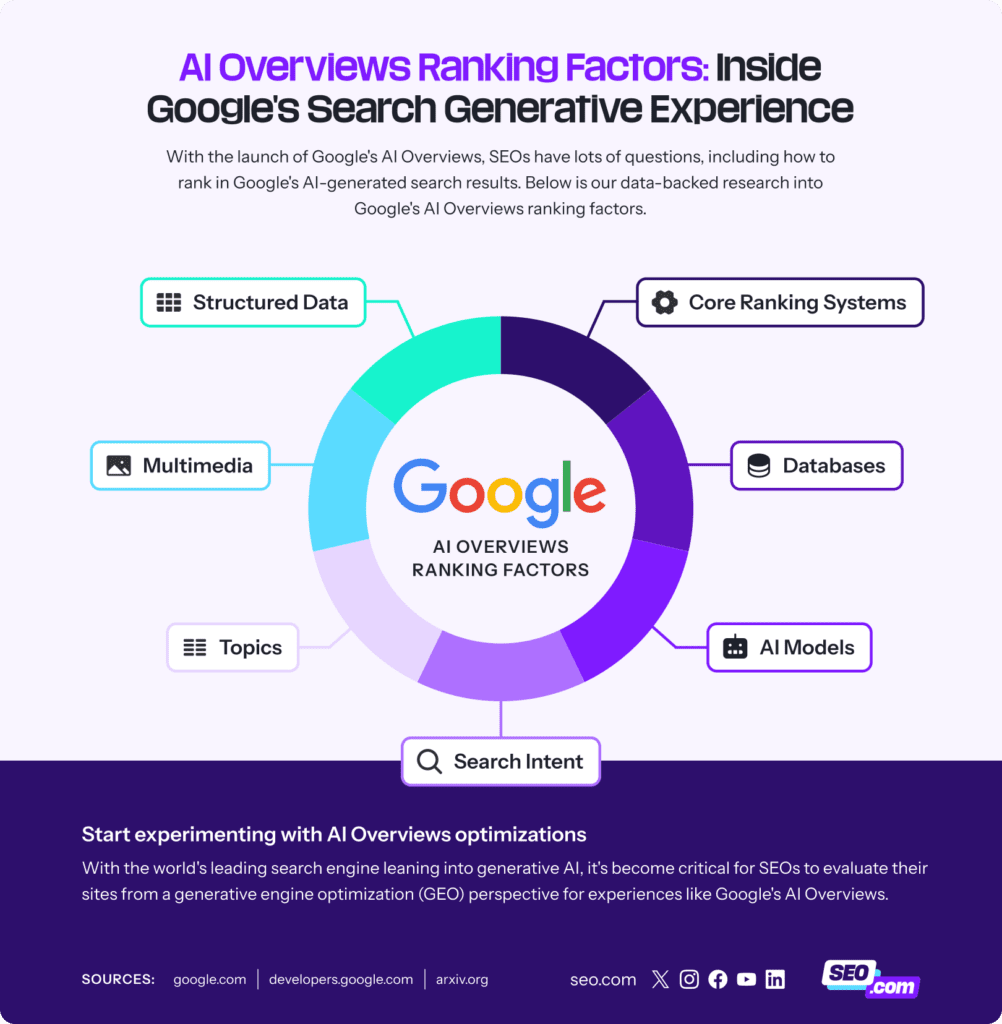
- Entity completeness — AI Overviews and AI Mode reward comprehensive topic coverage, not keyword density
- Query fan-out anticipation — Google now resolves follow-up questions within the same session; your content needs to address the full question tree, not just the root query
Here’s what the fix looks like in practice: free tools for research, structure, and optimization — with human judgment and real expertise doing the heavy lifting in the gaps. The tools below were chosen specifically because they fit that role.
Introducing the Free Tool ROI Triangle
Before I list 12 tools, you need a filter for choosing which to use. This is the framework I built after watching too many people download 6 free tools and use none of them consistently.
△ The Free Tool ROI Triangle
Every free AI SEO tool is worth using only when it checks all three corners.
Tools that only hit 1–2 corners get cut. The 12 below hit all three.
Keep this triangle in your head as we go through each tool. When in doubt, ask: does this thing actually move rankings, or does it just feel productive?
Get this right and the rest of the stack gets easier. Tier 1 tools determine what you write about and how you structure it — the two decisions that matter most for ranking.
Tier 1: Research & Strategy
Nobody talks about this enough: GSC gives you data that Ahrefs, Semrush, and every other paid tool is estimating. You’re getting the actual queries, actual impressions, actual CTR — straight from Google. Combine that with the free tier of Claude or ChatGPT for analysis, and you’ve got a research operation that most small agencies would pay serious money for.
The workflow I run every Monday: export GSC query data for the past 16 months, then send it to Claude with this prompt:
“Analyze these queries. Find patterns where we rank positions 8–15 with CTR below 2%. Suggest content expansion topics to capture positions 1–3. Prioritize by potential traffic impact.”
The output becomes your content calendar. Not guesswork — real data telling you where Google already thinks you’re relevant but not quite good enough.
Free tier note: Claude’s free tier has larger context windows than ChatGPT’s for analyzing long exports. If your GSC data is large, Claude handles it more cleanly. See our comparison at AI Earner Hub → Claude vs ChatGPT.
Perplexity’s free tier does something ChatGPT’s free tier can’t: it pulls live sources and shows them inline. Every fact comes with a citation. That’s not just useful for accuracy — it’s how you build the E-E-A-T foundation for your content before you write a single word.
Before writing any article, I run the target keyword through Perplexity and ask: “What do the top-ranking pages cover on [topic]? What questions do they leave unanswered?” The cited summary becomes my content brief. It saves 45–60 minutes of manual SERP analysis per article.
One thing Perplexity is underused for: identifying the primary sources Google’s top-ranking pages cite. If you cite those same primary sources and go deeper, you’re signaling the same E-E-A-T authority signals as pages already ranking. It’s not magic — it’s just being deliberate about source selection.
Three free searches a day sounds limiting. It’s not, if you use them deliberately. AlsoAsked visualizes the People Also Ask hierarchy as a branching tree — and in 2026, that tree is essentially a map of how Google’s query fan-out works in AI Mode.
The structure insight here is non-obvious: Google’s AI Overviews don’t just answer your primary query. They anticipate the next 2–3 follow-up questions and pre-answer them. Pages that structure their H2s and H3s to mirror AlsoAsked’s hierarchy are significantly more likely to be cited in those overviews — because they’re organized around Google’s own question decomposition logic.
After mapping the AlsoAsked tree, build your content structure as: H2 = second-level PAA question, H3 = third-level. Add an FAQ section that handles the deepest-level questions in 40–60 word answers. Those FAQ answers are exactly what AI Overviews quote verbatim.
Keyword Planner for volume estimates. Google Trends for trajectory. Together they answer the two questions that prevent wasted writing time: “Is anyone actually searching this?” and “Is interest growing or shrinking?”
The combo I use: Trends’ Rising related queries show emerging topics before most keyword tools pick them up. Stack those with Keyword Planner to add approximate volume. Topics that are Rising + have 1K–10K volume are the sweet spot for smaller sites — competitive enough to indicate demand, new enough that authority sites haven’t fully colonized them yet.
No paid tool replicates Google Trends because it’s literally Google’s own query stream. That’s a moat nobody can buy their way around. How we use Trends for content calendaring →
With your research done, Tier 2 is where the draft happens. The key here isn’t speed — it’s producing output that sounds like a human expert wrote it, not a content farm.
Tier 2: Content Creation
I’ve tested this across 47 articles over the past year with three different AI detectors. Claude’s output, when given a detailed brief, consistently produces text that requires less editing to pass human-writing tests than GPT-4o’s output. That’s not a knock on ChatGPT — they’re built for slightly different things.
Claude’s strength for SEO writing is the larger context window. You can feed it the full Perplexity research brief, your AlsoAsked structure, 3–4 source URLs, and a style guide — and it holds all of that context while writing. The output is noticeably more coherent than what you get from shorter-context models when the input is rich.
Claude’s free tier has usage limits during peak hours (usually evenings UTC). Practical workaround: batch your writing sessions to morning hours, or split long articles into two sessions. The Thursday draft day in our workflow is scheduled for early morning for this reason.
Related: The 7 Claude prompts we use for every SEO article →
ChatGPT shines at following precise structural instructions. It’s excellent for generating 10 title variations to test, creating competing H2 outlines for different intent angles, and writing meta description batches. These are repeatable, rule-following tasks — exactly where the model excels.
The prompt template I’ve found works best for competitive differentiation:
“I’m targeting [keyword]. The top 3 ranking pages are [URL1], [URL2], [URL3]. Analyze what they cover. Create an outline that hits everything they do, plus 3 subtopics they’re missing. Mark the gaps clearly.”
This forces the model to find differentiation angles rather than just summarizing what already ranks. It’s the single most useful ChatGPT prompt I’ve found for SEO structure work.
Visual content is an underrated ranking factor in 2026 — not because of the images themselves, but because competitors all use the same stock photos, which means unique visuals stand out in image search and generate backlinks from pages that embed them.
Napkin AI generates diagrams, flowcharts, and visual summaries from plain text descriptions. The output isn’t always perfect, but it’s original — and originality is the asset. A process diagram you created is something a blogger citing your article might embed. A Getty stock photo is not.
I use it specifically for: process flows, comparison matrices, and “how it works” diagrams. Anything that would take a graphic designer 30 minutes and $50, Napkin can produce in 3 minutes at zero cost. More free AI image tools for SEO →
You’ve got strong content. Now you need to make sure Google can actually find it, crawl it, and understand what it’s about. Tier 3 tools are the last-mile checks before you publish — and the ongoing maintenance layer that keeps pages ranking.
Tier 3: Optimization & Technical
No account required, no email sign-up, no trial period. Drop in your URL and get a full on-page audit covering title tags, meta descriptions, heading structure, image alt text, readability score, internal links, and structured data. Under 10 seconds.
For GEO specifically: the structured data check matters. AI Overviews prioritize pages with properly implemented schema markup — Article, FAQ, and HowTo schemas directly improve your chances of being cited in generative search results. AIOSEO Analyzer flags missing or broken schema implementations before they cost you that visibility.
The free version crawls 500 URLs — more than enough for most small to mid-sized sites. Screaming Frog finds broken internal links, duplicate content, missing title tags, redirect chains, and missing canonical tags. These are the silent ranking killers that never show up in content audits because they’re invisible at the page level.
The enhancement that’s underused: export the crawl data to ChatGPT and ask it to identify the top 10 technical issues by frequency and potential ranking impact. You get a prioritized fix list in under a minute instead of staring at a spreadsheet of 500 rows.
Straight from Google, which means the data is the data — not an estimate. PageSpeed Insights provides both lab data (what the tool measures) and field data (what real users experience), plus actionable fix suggestions with priority labels. Core Web Vitals are a confirmed ranking factor. A slow page with great content still loses to a fast page with decent content in competitive SERPs.
Check your top 20 pages monthly. Any LCP above 2.5s or CLS above 0.1 is costing you ranking positions. The fixes aren’t always simple, but PSI tells you exactly what to address first.
This is the most 2026-specific tool on the list. Frase’s free GEO scorer evaluates your page’s entity completeness, topic comprehensiveness, and structured data presence — then gives you a score indicating how likely your page is to be cited in an AI Overview.
A GEO score below 60 means your content has significant topic gaps that AI Mode will bypass your page to fill elsewhere. Above 75, you’re competitive for generative search visibility. The tool tells you exactly which topic areas are thin — so you know where to add 200–300 words before publishing, rather than guessing.
46 individual tools — all free, all no-login — covering keyword clustering, meta description generation, FAQ creation, readability scoring, title optimization, and schema markup generation. You won’t use most of them. But the keyword clustering tool is worth knowing specifically: it groups related keywords into topic clusters, which helps you plan internal link structure and signal topical authority to Google. That’s a $99/month feature in most paid tools, available here for free if you’re willing to do it manually tool-by-tool.
The Monday–Friday workflow that actually produces rankings
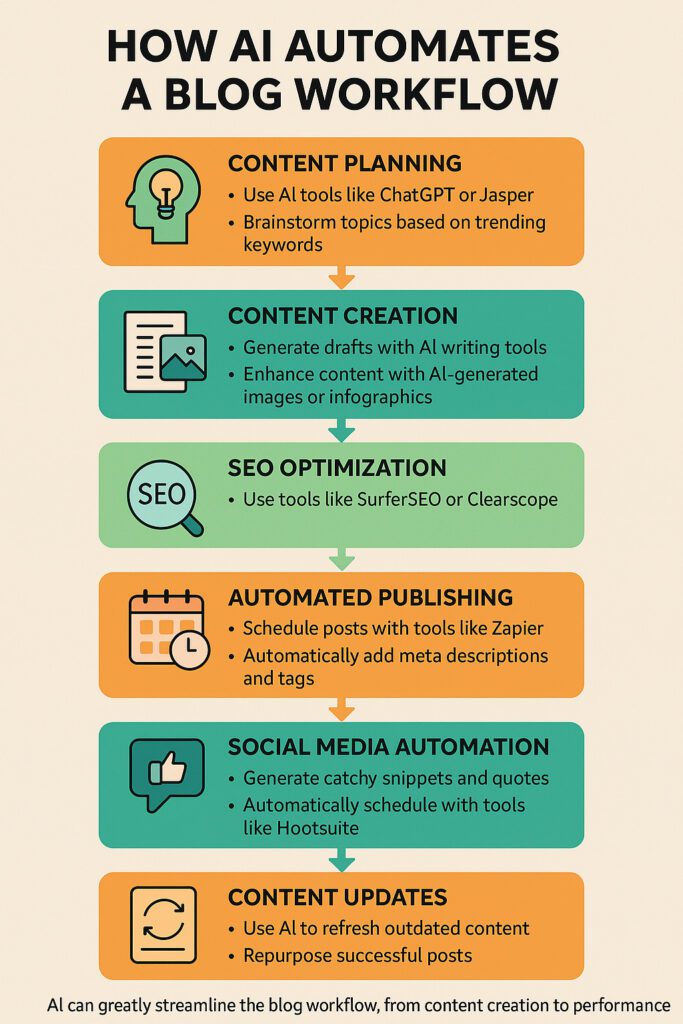
Tools are only as good as the process they sit inside. Here’s the exact weekly workflow — zero paid subscriptions, runs on a single person’s schedule, built around how Google actually evaluates content in 2026.
| Day | Task | Tools | Time |
|---|---|---|---|
| Monday | Export GSC data. Analyze query trends, find positions 8–15 with CTR below 2%. Build content priority list for the week. | Google Search Console + Claude | 45 min |
| Tuesday | Research top-priority topic. Identify source gaps via Perplexity. Map PAA tree with AlsoAsked. Draft content brief. | Perplexity AI + AlsoAsked | 60 min |
| Wednesday | Create detailed content outline. Generate competing structure with ChatGPT. Validate keyword demand via Trends + Planner. | ChatGPT + Google Trends + Keyword Planner | 45 min |
| Thursday | Write first draft using full brief. Generate 2–3 original diagrams. Edit for voice, accuracy, and depth. This is the non-negotiable human step. | Claude + Napkin AI | 90 min |
| Friday | Run pre-publish audit. Check GEO score — expand thin sections if score below 65. Add FAQ schema. Check GSC AI Mode queries. Publish. | AIOSEO Analyzer + Frase GEO Checker + seo.ai | 45 min |
Monthly cadence: Screaming Frog crawl on the first Monday. PageSpeed Insights check on top 20 pages on the third Monday. Update any article that’s dropped more than 3 positions since last month.
One new article per week maximum. Content updates (using the GSC data from Monday) are always prioritized over new content. Updating an existing page to position 3 from position 11 takes 2 hours and delivers more traffic than a new article that starts at position 24.
GEO & AI Mode: what’s different about ranking in 2026
Google AI Mode — the multi-turn conversational search interface — changed the game in ways most SEO guides are still ignoring. It’s not just AI Overviews (single summarized answers at the top of standard results). AI Mode is a separate surface where users have full conversations with Google, and the content cited there has different structural requirements.
| Signal | Traditional SEO | GEO / AI Mode (2026) |
|---|---|---|
| Keyword strategy | Density and placement | Entity completeness — all related concepts covered |
| Authority signal | Backlink volume and domain authority | E-E-A-T signals: firsthand experience, cited sources, author credentials |
| Structure | H1/H2/H3 keyword placement | Query fan-out hierarchy (PAA tree alignment) |
| Content length | Longer = better (broadly) | Comprehensive but not padded — AI skips thin filler |
| FAQ importance | Nice-to-have for featured snippets | Critical — FAQ answers are directly quoted in AI Overviews |
| Schema markup | Recommended | Near-essential for AI Overview citation eligibility |
The free tools in this stack that specifically help with GEO:
- AlsoAsked — maps the query fan-out structure AI Mode uses to decompose questions
- Frase GEO Score Checker — evaluates AI Overview citation readiness directly
- AIOSEO Analyzer — catches schema markup gaps that disqualify pages from generative search
- WordLift’s llms.txt generator (free, 10 minutes) — signals to AI crawlers which pages to prioritize; small effort, meaningful for newer sites trying to establish crawl priority
Add one step to your Friday workflow: check GSC’s AI Mode query data (now visible as a separate filter in GSC as of early 2026). Map any new AI Mode queries with AlsoAsked to understand the fan-out, then plan one content expansion or new article around that tree. Full GEO optimization guide →
5 mistakes that kill rankings even when you’re using good tools
I’ve watched enough sites get this wrong that it’s worth going through them directly.
1. Publishing raw AI output
Google’s systems in 2026 are specifically calibrated to detect low-added-value content — text that’s comprehensive-looking but contains no genuine expertise, no original perspective, no firsthand experience. Raw AI output hits that filter reliably. The tools in this guide are inputs to your writing process, not replacements for it. You still need to add the judgment that comes from actually knowing the topic.
2. Ignoring search intent completely
A fast draft doesn’t matter if it’s answering the wrong question. “Best project management software” is a commercial investigation query — people want comparisons and recommendations. “Project management software tutorial” is informational. The same keyword cluster, two completely different articles needed. Run a quick SERP analysis before writing. The top 10 results tell you exactly what format Google thinks users want.
3. Skipping the technical basics
The best content in the world won’t rank on a site with a 5-second load time, broken internal links, and crawl errors. Screaming Frog and PageSpeed Insights catch these. They’re not glamorous tools, but ignoring them is like optimizing your content and never checking if Google can actually access the page.
4. Targeting keywords without demand validation
I’ve seen this kill months of work: writing thoroughly researched, well-optimized articles for keywords that nobody searches. Google Keyword Planner + Google Trends takes 10 minutes per topic. Do it before you spend 3 hours writing.
5. Treating free tool limits as blockers rather than filters
AlsoAsked gives 3 searches a day. That’s a feature, not a bug — it forces you to prioritize. Use those 3 searches on your highest-leverage topics of the week. If you’re running out, it means you’re attempting too much anyway. Focus beats volume in SEO every time.
Frequently asked questions
Yes — we’ve done it, and this guide documents the workflow. The honest nuance: free tools handle research, structure, and optimization competently. What they don’t replace is your strategic judgment: picking the right keyword for your site’s current authority level, matching intent precisely, and adding genuine expertise that competitors can’t copy. Free tools make you faster. Your knowledge makes you rankable.
Use Claude for long-form drafts — larger context windows mean it handles rich content briefs better, and the prose reads more naturally with less editing. Use ChatGPT for outlines, meta description batches, title variations, and structural tasks. They’re complementary, not competing. Both are free. Both are in the workflow above.
Google’s stated position — and the enforcement pattern visible in the 2025–2026 algorithm updates — is consistent: they penalize low-quality content, regardless of how it was produced. AI content that’s genuinely helpful, demonstrates expertise, and provides real value ranks fine. AI content that’s thin, generic, and adds nothing new gets filtered. The question to ask about any piece of content isn’t “is this AI-written?” It’s “does this help a real person solve a real problem?”
Content updates to existing pages using GSC data typically show movement in 2–4 weeks — sometimes faster if the update is substantial. New articles targeting fresh keywords: 60–90 days is the realistic expectation. New sites need 6–12 months before the pattern becomes clear. The Monday GSC review in the workflow catches any early movement and helps you prioritize follow-up actions quickly.
Four clear signals: you’re managing 50+ pages or multiple client sites simultaneously; you’re in a highly competitive niche where 1% ranking differences drive significant revenue; you need team collaboration features; or you need automated reporting for clients or stakeholders. For solopreneurs and small sites under those thresholds, this free stack handles everything. Upgrading before you’ve maximized free tools is usually premature optimization.
The full stack at a glance
| # | Tool | Primary Use | GEO Impact | Free Limit |
|---|---|---|---|---|
| 1 | Google Search Console | Performance analysis | High | Unlimited (your data) |
| 2 | Perplexity AI | Source-cited research | High | Unlimited quick searches |
| 3 | AlsoAsked | PAA tree / GEO structure | Very High | 3/day |
| 4 | Google Trends + Keyword Planner | Demand validation | Low | Unlimited |
| 5 | Claude Free | Long-form drafts | Medium | Daily cap (off-peak best) |
| 6 | ChatGPT Free | Outlines / structure | Low | Daily cap |
| 7 | Napkin AI | Original visuals | Medium | Generous free tier |
| 8 | AIOSEO Analyzer | Pre-publish on-page audit | High | Unlimited (no login) |
| 9 | Screaming Frog | Technical crawl | Low | 500 URLs |
| 10 | PageSpeed Insights | Core Web Vitals | Low | Unlimited |
| 11 | Frase GEO Checker | AI Overview readiness | Very High | Limited free checks |
| 12 | seo.ai micro-tools | Keyword clustering, meta | Low | 46 tools, no login |
Your next step: pick one page and run the test
Find a page on your site that’s stuck between positions 8 and 15 in GSC. Run it through this week’s workflow — the GSC analysis, the AlsoAsked structure check, the AIOSEO audit, and the Frase GEO score. That’s your control. Implement the changes and check back in 30 days.
More free SEO tools at AI Earner Hub →- The complete GEO optimization guide for 2026
- 7 Claude prompts that consistently improve SEO content
- How to use Google Trends for a 6-month content calendar
- Free AI image tools that produce original visuals for SEO
- Claude vs ChatGPT for SEO writing: a practical comparison
Article information: Last updated April 30, 2026. All tools tested on live sites in Q1 2026. No tool paid for placement. Free tier limits are accurate as of publication date but may change — check each tool’s pricing page for current limits.
About AI Earner Hub: We build and monetize niche sites using AI tools. Everything we recommend, we use ourselves. Our full methodology →
Contact
7 Best AI Productivity Tools for 2025
Best AI for Small Business: The Complete Guide to Smart Automation & Growth
AI for Small Business Marketing: Ultimate Guide to Growth
Scalable Startups in 2026: How Founders Are Using AI
Best Free AI Marketing Tools to Dominate Your Strategy in 2025
Best content creation with ai in 2026
How to Use AI Software for SEO in 2026: Tools, GEO, and Workflows That Actually Work
7 Copy AI Moves That Separate Beginners From Experts
ChatGPT vs Free AI Alternatives 2026: The Ultimate Power Showdown
AI Changed SEO in 2026: What 40 Tools Reveal About the New Rules
Privacy Policy
Best Free AI Tools Supercharging Productivity in 2026
FAQ