Best AI Tools for Work & Study
Beyond ChatGPT
TL;DR – What You Need to Know in 2 Minutes
- ChatGPT’s dominance is structurally ending. Its market share fell from ~87% in January 2025 to roughly 65% by January 2026 — the fastest decline any dominant consumer AI platform has experienced.
- Specialization beats generalism. A 2024 McKinsey study found professionals using purpose-built AI tools for specific tasks report 35% higher satisfaction and 20% greater output than those relying on a single general-purpose tool.
- The clearest winners by category: Perplexity for live-web research, Google NotebookLM for document-based study, Cursor for software development, Otter.ai/Granola for meeting capture, Elicit for academic literature, and Gamma for presentations.
- Most tools have a real free tier. You can build a powerful stack for approximately $0–$50/month depending on your usage volume.
- Critical warning: hallucination is not solved. Every AI tool on this list can fabricate facts with high confidence. Never use AI-generated citations in academic submissions without independently verifying each source.
- The “best” tool is always context-dependent. A solo PhD student and a 50-person product team have almost no overlap in optimal tool choice. This guide covers both.
- Recommended starter stack: Perplexity (research) + NotebookLM (documents) + Otter.ai or Granola (meetings) + Cursor or GitHub Copilot if you code. Total cost: $0–$30/month depending on volume.
Why Look Beyond ChatGPT in 2026?
When ChatGPT launched in November 2022, it consumed the oxygen in the room. Everything else felt like a footnote. That period is over.
ChatGPT’s share of the AI chatbot market fell from approximately 87% in January 2025 to somewhere between 64–68% by January 2026 — a 19-percentage-point drop in twelve months. That’s not a minor correction. It’s a structural shift in how people work with AI. The tools that ate into that share aren’t generic competitors doing the same thing more cheaply. They’re specialized platforms that simply do specific jobs better than any general-purpose chatbot can.
The deeper issue is that general-purpose AI assistants have a fundamental design constraint: they optimize for broad competence, not deep specialization. ChatGPT is genuinely excellent at producing readable prose, explaining concepts, and basic coding help. But if you’re a researcher trying to understand whether a finding from 2019 has been contradicted by subsequent studies, or a developer debugging across twelve files simultaneously, or a student who needs to internalize 400 pages of lecture PDFs before an exam — a chat interface is the wrong tool.
The most productive researchers and professionals in 2026 don’t have one AI tool. They have a deliberate stack, with each layer matched to a specific type of cognitive work.
That McKinsey finding mentioned in the TL;DR deserves unpacking. The 35% higher satisfaction and 20% greater output from specialized tools versus single general-purpose tools wasn’t about any one tool being magic. It was about the cognitive friction of switching context. When your tool is built for exactly what you’re trying to do, you spend less mental energy fighting the interface and more actually working.
I’ve spent the better part of the last 18 months testing these tools seriously — not a 30-minute trial, not a manufactured demo scenario, but real work: actual research projects, actual code, actual meetings. What follows is what I found.
How I Evaluated These Tools
I’m upfront about my evaluation criteria because you should be able to reproduce or challenge any conclusion here.
Testing period: Each tool received a minimum of 4 weeks of active use on real work. Most have been in my workflow for 6–14 months. I retested all of them in April–May 2026 to catch version changes.
Evaluation dimensions (1–10 scale):
- Output accuracy — factual correctness rate
- Workflow integration — fits into real work vs. requires context-switching
- Speed — time to useful output
- Citation quality — verifiable sources
- Hallucination rate — frequency of confident errors
- Price/value ratio — cost vs. time saved
- Learning curve — time to productive use
- Reliability — uptime, consistency across sessions
Where third-party benchmarks exist (SWE-bench for coding, citation accuracy studies for research tools), I’ve cited them directly with links. Where they don’t, I describe my testing methodology explicitly.
Perplexity AI — The Best Tool for Live-Web Research
I’ll say this directly: Perplexity has done more to change my research habits than any other tool in the last two years. Not because it’s an impressive demo, but because it solved a real problem — the endless cycle of opening 14 browser tabs, reading introductory paragraphs, and then re-reading the same surface-level information across different sites.
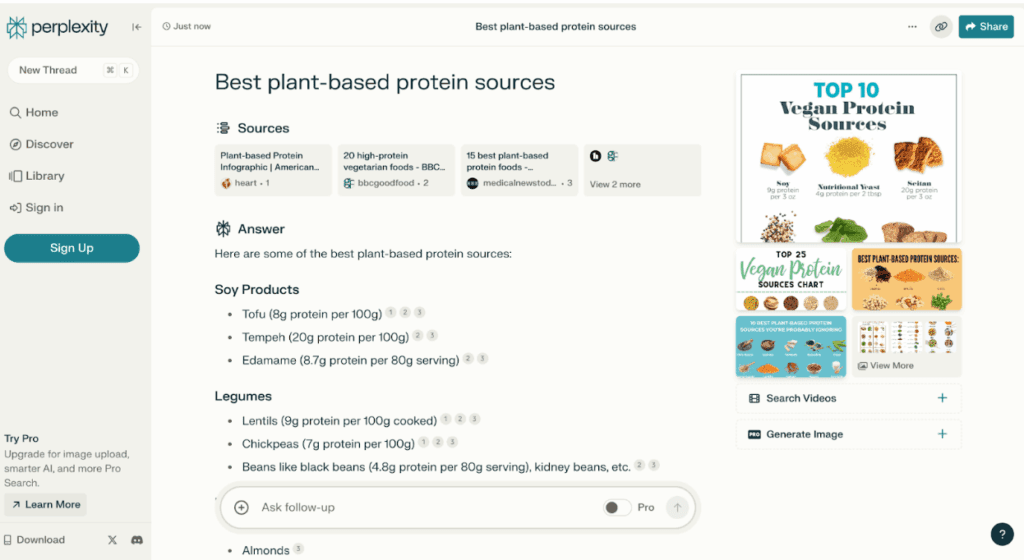
Perplexity is fundamentally a different thing from a chatbot. It’s an answer engine that synthesizes information from the live web, shows you exactly which sources it used, and lets you trace every claim back to its origin. As of mid-2026, it serves roughly 45 million active users and is projecting over 1.2 billion monthly queries by mid-year — 800% year-on-year growth.
What It Actually Does
You ask a question in natural language. Perplexity queries the live web (or a selected source set — Academic, YouTube, Reddit, etc.), synthesizes an answer from 5+ sources, and presents inline citations for every factual claim. The Deep Research mode is more aggressive: it autonomously runs dozens of searches, reads full pages, and produces a structured report that can take 3–10 minutes but covers a topic far more comprehensively than a single query. For scientific queries specifically, third-party testing has measured 97.2% accuracy in Deep Research mode.
Best For
- Current events & recent data
- Fact-checking claims quickly
- Exploratory research on unfamiliar topics
- Building reading lists with verified sources
- Research-backed competitive analysis
Limitations
- Doesn’t analyze your own private documents
- Deep Research mode can mis-weight sources
- Pro tier needed for many advanced features
- Not suitable for synthesis across paywalled academic papers
Where Perplexity falls down is private document analysis. If you need to query your own uploaded PDFs, reports, or lecture notes, it’s the wrong tool — that’s NotebookLM’s domain. The other honest limitation: the free tier’s citation accuracy drops slightly versus Pro because the underlying model is weaker. For serious research, the $20/month Pro tier is worth it purely for the model quality improvement.
Google NotebookLM — The Best AI Study Companion
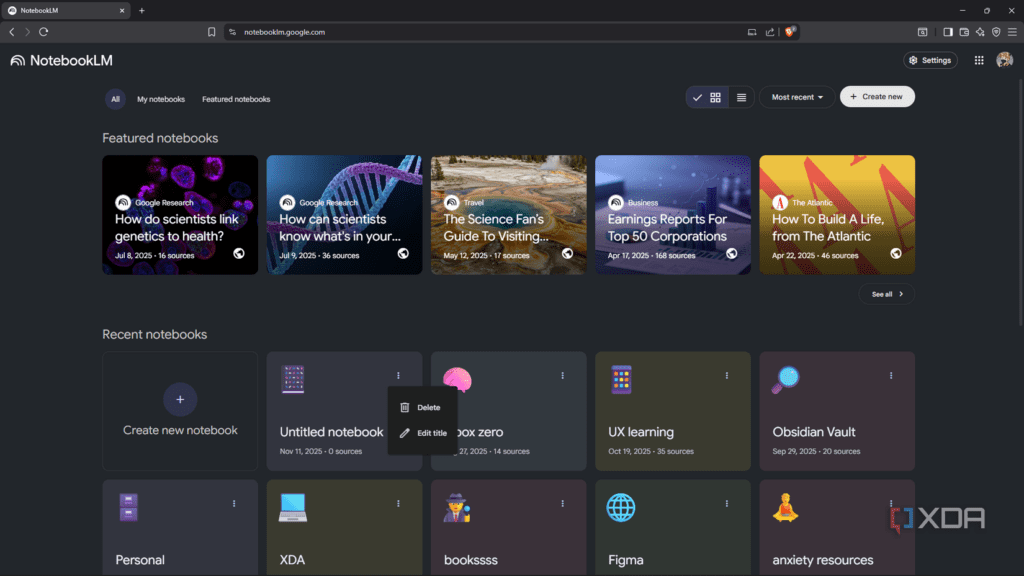
NotebookLM is genuinely one of the most original products to emerge from the entire AI wave. It’s not trying to be a chatbot. It’s trying to give you a research partner that has actually read every document you’ve ever given it — and, critically, only those documents. This “source-grounded” constraint is a feature, not a limitation.
I’ve used NotebookLM to work through the equivalent of a 700-page academic course in compressed time by uploading all lecture notes, assigned readings, and past exams into a single notebook. The ability to ask “what does the Kahneman 2011 reading say about System 2 thinking and how does it connect to the model in the week 8 lecture?” — and receive a response with precise citations pointing to specific pages of my own materials — is the kind of thing that genuinely changes how you study.
Standout Features in 2026
The 1-million-token context window (roughly 700,000 words) lets you load entire textbooks, multiple research papers, and a semester’s worth of notes simultaneously. Audio Overviews — the conversational two-host podcast summaries — remain NotebookLM’s most distinctive feature; no competitor has credibly replicated the quality. The newer Video Overviews and Slide Decks features (November 2025 additions) are genuinely useful for converting research into shareable formats. NotebookLM Plus, bundled with Google One AI Premium (~$19.99/month) or available on Workspace plans from ~$14/month, expands limits to 300 sources and 500 queries per day.
Best For
- Deep synthesis of uploaded documents
- Study guides, flashcards, quiz generation
- Audio learning from dense text
- Teams reviewing large internal document sets
- Literature review from collected PDFs
Limitations
- No real-time web access (Deep Research mode is slower than Perplexity)
- Slide Deck output needs manual refinement
- Deep Research takes 3–5 minutes per session
- No speaker identification in transcripts
Cursor — The AI-Native Code Editor That Actually Works
I want to be precise about what makes Cursor different, because a lot of the coverage is either breathless hype or dismissive skepticism, and neither is useful.
Cursor is a fork of VS Code with AI capabilities built into the editor core — not bolted on as an extension. That architectural difference matters. When AI is a plugin, it can only see what you show it. When it’s the editor itself, it can index your entire codebase semantically, understand relationships between files, and generate changes across multiple files simultaneously in a way that a plugin physically cannot.
The company’s growth numbers are startling: $1M to $2B ARR in approximately 28 months — according to JetBrains’ January 2026 AI Pulse survey, Cursor has reached 18% workplace adoption among professional developers, tied with Claude Code and behind only GitHub Copilot at 29%.
The Benchmark Reality
On SWE-bench Verified (the standard benchmark for AI coding agents on real GitHub issues), Cursor Pro scores 51.7% task resolution versus GitHub Copilot’s 56.0%. Copilot wins on raw accuracy. But Cursor resolves tasks in an average of 62.95 seconds versus Copilot’s 89.91 seconds — roughly 30% faster. For developers running dozens of agentic tasks per day, that compounds. A controlled 6-week comparison across 12 developers found Cursor shows 35–45% faster feature completion for complex, cross-file tasks; Copilot shows 20–30% improvement for standard single-file work. The advantage is task-type-dependent.
Best For
- Large, complex codebases (multi-file refactors)
- Full-time developers as primary IDE
- Teams who spend 15%+ of time on cross-file tasks
- Developers who value speed over raw accuracy
Limitations
- Only works in Cursor IDE (not your existing editor)
- Higher price than Copilot for teams
- Aggressive product velocity = frequent plan changes
- Overkill for occasional coding tasks
GitHub Copilot — The Pragmatic Choice for Teams
GitHub Copilot is a fundamentally different product from Cursor, even though they’re often compared directly. Copilot is an extension that runs inside your existing IDE — VS Code, JetBrains, Neovim, whatever you already use. It doesn’t replace your editor. That’s its strength and its constraint.
With over 4.7 million paid subscribers and 26 million total users, Copilot remains the market leader by installed base. The 38% inline suggestion acceptance rate (Q1 2026 data from GitHub) is the highest published figure in the category. For teams already embedded in the GitHub ecosystem — pull requests, Actions, code review, security scanning — the integration depth is simply unmatched.
For a 10-developer team, Cursor Business costs $400/month versus Copilot Business at $190/month. That $210/month difference ($2,520/year) has to be justified by the productivity gains from Cursor’s multi-file editing. Based on testing, that math works for teams spending more than 15–20% of their time on cross-file refactoring tasks. For standard development work, Copilot’s 20–30% productivity improvement at half the price is often the better economic decision.
Best For
- Teams already on GitHub Enterprise
- Developers using multiple IDEs
- Cost-sensitive teams or solo developers
- Organizations with strict compliance requirements
Limitations
- Narrower context window than Cursor for large repos
- 30% slower task resolution than Cursor in agentic mode
- Less effective on complex multi-file refactors
Elicit — Academic Literature Review Done Right
Elicit occupies a specific niche that no general-purpose AI can fill: structured academic research at scale. It’s built by Ought, a nonprofit research lab, and its design philosophy reflects that — the emphasis is on epistemic rigor, not engagement metrics.
Where ChatGPT will confidently summarize a research topic and hallucinate papers that don’t exist, Elicit queries a database of real papers, extracts specific structured data from each one (methodology, sample size, effect size, study type), and presents it in a comparative table that you can export. It covers Semantic Scholar’s index of 200+ million papers.
The core workflow: type a research question in natural language (“What is the effect of sleep deprivation on working memory in adults?”). Elicit surfaces the 20 most relevant papers, extracts structured data columns automatically (population, intervention, outcome, sample size), and lets you add custom extraction columns with AI. You can then export the full table to CSV or Notion. The Paper Chat feature works similarly to NotebookLM — upload PDFs, query them — but with more structured extraction and less conversational polish.
Best For
- Systematic literature reviews
- Evidence-based research synthesis
- PhD students and academic researchers
- Anyone who needs to extract data across 50+ papers
Limitations
- Weaker on non-English literature
- Less useful for exploratory/unknown topic research
- No audio overview or visual synthesis
- Free tier severely limited (limited papers/month)
Otter.ai — Meeting Transcription for Teams
Otter.ai built the AI meeting transcription category and remains the most established name in it. It joins your meetings as a bot participant (visible to all attendees), generates real-time transcripts, identifies speakers, and produces summaries and action items automatically. Integration with Zoom, Google Meet, and Microsoft Teams is seamless.
Otter’s key differentiator is breadth: it works across every major video platform, has the most comprehensive searchable archive in the category, and integrates with Notion and Salesforce. Speaker identification is genuinely accurate — much better than most competitors at distinguishing between 6+ participants. The cross-meeting search lets you query across your entire meeting history, which becomes extraordinarily useful after 6+ months of use. The tradeoff: a visible bot joins your calls, which can affect meeting dynamics in sensitive contexts (executive negotiations, sensitive HR conversations).
Best For
- Product and customer success teams
- Organizations with multiple video platforms
- Teams who need searchable meeting archives
- Sales teams syncing notes to CRM
Limitations
- Visible bot may disrupt sensitive meetings
- Audio uploads to vendor cloud (privacy consideration)
- Free tier is limited to 300 minutes/month
Granola — The Bot-Free Alternative for Sensitive Meetings
Granola solves a specific problem that Otter, Fireflies, and Fathom all have: none of them can be invisible. They all join as a visible bot participant, which changes the nature of the conversation — sometimes subtly, sometimes not at all, but sometimes significantly. Board-level discussions, investor conversations, sensitive negotiations — these contexts don’t want a third-party AI visible in the participants list.
Granola captures device audio directly rather than joining as a participant. The meeting dynamics stay intact. Enterprise clients as of 2026 include Vanta, Gusto, Asana, Cursor, and Mistral AI. The company hit unicorn status with a $1.5B valuation in its Series C.
The UX is intentionally minimal: you open Granola before a meeting, let it run in the background, and it produces a clean note after the call. No bot joins. No notification to other participants. The notes quality is genuinely good — structured, with clear action items. The limitations are real though: no speaker attribution (you get one stream of text, not labelled by person), no follow-up email drafting, and the Mac-native architecture means Windows users get a slightly less polished experience. An MCP server launched in February 2026 enables integration into broader AI workflows.
Best For
- Executive and board-level conversations
- Investor and partnership calls
- Mac users who want zero friction note-taking
- Anyone uncomfortable with visible meeting bots
Limitations
- No speaker identification (unlike Otter)
- No cross-meeting search (unlike Otter)
- Mac-first (Windows experience is secondary)
- No follow-up email drafting built in
Gamma — AI Presentations That Don’t Look Like AI Presentations
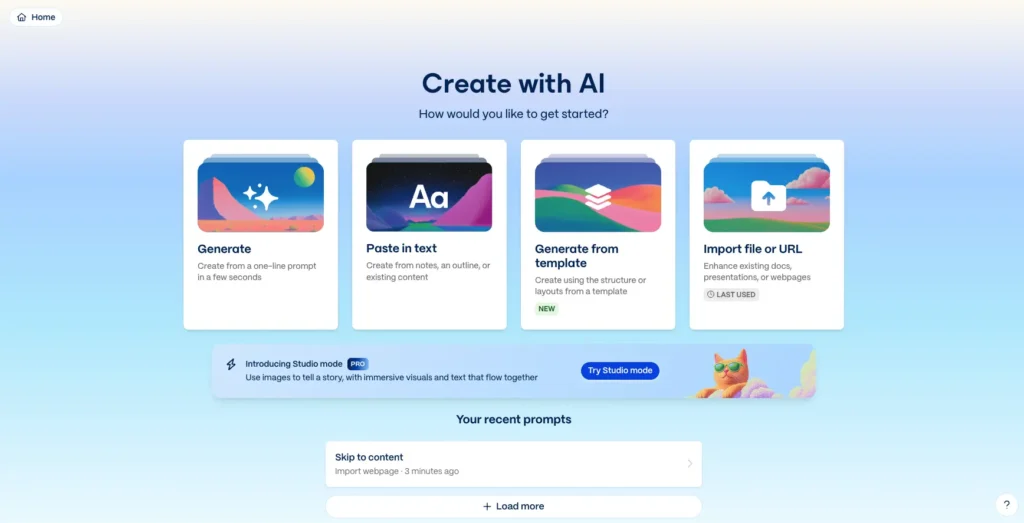
Gamma has reached 70 million users and $100M ARR. That’s not a minor success story. It’s the clearest signal that AI-assisted presentation creation has crossed from novelty to genuine productivity tool for a massive number of professionals.
The core proposition: paste in a document, prompt, or outline and receive a professionally designed, interactive presentation in minutes. What sets Gamma apart from competitors is the design quality of its output. Most AI presentation tools produce slides that feel like they were generated — decent structure, mediocre aesthetics, no visual identity. Gamma’s templates and layouts are genuinely usable without heavy redesign, which is the real test.
Gamma generates presentations primarily for online sharing rather than PPTX export — this is a deliberate product choice, but it’s worth knowing before you commit. The output is an interactive web-based format that looks excellent in a browser and handles embedded media well. However, if your final deliverable must be a polished PPTX file for a corporate environment that expects standard slide formats, Gamma’s PowerPoint export can break layouts — this is a known, documented limitation. For final PPTX deliverables, Microsoft Copilot + PowerPoint produces cleaner native output. Gamma wins on speed and first-draft quality for everything else.
Best For
- Internal presentations shared via link
- Rapid first drafts for any deck
- Startup and agency pitches (web format)
- One-pagers and visual documents
Limitations
- PPTX export breaks layouts reliably
- Less control than PowerPoint for pixel-perfect work
- Weaker for non-English language content
Claude (Anthropic) — Long-Form Reasoning and Document Analysis
Claude’s competitive advantage is not raw output speed or visual features. It’s reasoning quality and context handling over genuinely long documents. The 200K token context window (approximately 150,000 words) means you can upload an entire book manuscript, a multi-year research dataset, or a full contract suite and have a coherent conversation across all of it without losing thread.
In practice, Claude tends to outperform GPT-4o on tasks requiring careful, multi-step reasoning — analyzing competing arguments in a legal document, synthesizing contradictions across sources, or producing nuanced commentary on complex material. It’s also the most direct about expressing uncertainty, which matters in high-stakes contexts. Claude Code reached $2.5B run-rate revenue in nine months from launch and is the fastest-growing developer product on record by that metric.
Best For
- Legal, policy, and academic document analysis
- Long-form writing requiring consistent tone
- Complex reasoning tasks with multiple constraints
- Coding tasks requiring deep codebase understanding
Limitations
- No real-time web access in base version
- Less strong on image generation than GPT-4o
- Rate limits on free tier are restrictive
Gemini Deep Research — Best for Google-Ecosystem Users
Gemini 2.5 Pro’s Deep Research mode is a serious competitor to Perplexity for comprehensive research tasks, particularly for users already embedded in Google Workspace. It autonomously runs dozens of searches, reads full pages, and produces structured reports — similar to Perplexity’s Deep Research mode, but with tighter Google Docs integration. The free tier is meaningfully better than ChatGPT’s equivalent. For students and professionals already living in Google Docs and Drive, Gemini’s workspace integration creates genuine value that Perplexity can’t match.
Best For
- Google Docs / Drive users
- Deep Research on public web topics
- Gmail and Calendar integration
- Students on Google Workspace EDU
Limitations
- Deep Research slower than Perplexity
- Google data privacy considerations
- Less strong than NotebookLM for private document analysis
Scite & Consensus — Citation Intelligence for Researchers
Two tools that address a problem general AI cannot: knowing whether a scientific finding has been supported or contradicted by subsequent research.
Scite has classified over 1.2 billion citation statements in academic literature as supporting, contrasting, or mentioning the cited paper. At $20/month, it lets you ask “how well-supported is this finding?” before citing it — which is genuinely irreplaceable for serious academic work. Consensus answers research questions directly by aggregating and summarizing findings from peer-reviewed papers, with a clean natural-language interface and free tier.
Best For
- Verifying citation robustness before publication
- Systematic reviews in STEM and medicine
- Quick natural-language research Q&A (Consensus)
Limitations
- Scite cost is hard to justify for casual users
- Consensus less strong in humanities/social science
Recommended Tool Stacks by Role
The single most consistent finding from my testing: the right stack depends almost entirely on what you actually do day-to-day. Here are four realistic configurations:
Stack A — Solo Academic / PhD Student
Total: ~$52/month. Replace Scite with Consensus (free) if budget is tight.
Stack B — Knowledge Worker / Consultant
Total: ~$64–70/month. This covers nearly every knowledge-work modality.
Stack C — Solo Software Developer
Most productive senior developers converge on Cursor for daily editing + Claude Code for complex architectural tasks.
Stack D — Budget-Conscious Student
Total: $0/month. This is a genuinely powerful stack for most study needs.
Master Comparison Table
| Tool | Primary Use Case | Accuracy | Speed | Free Tier | Best Paid Plan | Key Limitation |
|---|---|---|---|---|---|---|
| Perplexity AI | Live web research | 9.1 | 9.5 | Strong | $20/mo | No private doc analysis |
| Google NotebookLM | Document study / synthesis | 9.5 | 7.8 | Very strong | ~$20/mo (Google One) | Web access slower |
| Cursor | AI-native coding IDE | 8.5 | 9.5 | Limited | $20/mo | Only works in Cursor IDE |
| GitHub Copilot | Coding (any IDE) | 9.0 | 8.0 | 2K completions | $10/mo | Narrower codebase context |
| Elicit | Academic lit review | 9.2 | 7.5 | Very limited | $12/mo | Weak on non-English papers |
| Otter.ai | Meeting transcription | 8.8 | 9.3 | 300 min/mo | $8–10/mo | Visible bot joins call |
| Granola | Bot-free meeting notes | 8.2 | 8.5 | 25 lifetime meetings | $14–18/mo | No speaker attribution |
| Gamma | AI presentations | 7.8 | 9.4 | 400 credits | $10–20/mo | PPTX export unreliable |
| Claude (Anthropic) | Long-form reasoning | 9.0 | 8.3 | Moderate | $20/mo | No real-time web by default |
| Gemini Deep Research | Research (Google ecosystem) | 8.5 | 8.0 | Strong | $19.99/mo | Slower deep research |
| Scite | Citation quality checks | 9.3 | 8.0 | Very limited | $20/mo | Niche: academic only |
| Consensus | Research Q&A from papers | 8.0 | 9.0 | Good | $9.99/mo | Weak in humanities |
Frequently Asked Questions
Is ChatGPT still worth using in 2026?
Yes, as a general-purpose assistant and for tasks where GPT-4o’s image generation and broad knowledge are useful. But it’s no longer the default best choice for any specific task category. For research, coding, meetings, or academic literature, purpose-built tools consistently outperform it. Use ChatGPT as a utility layer, not as your primary stack.
What’s the best free AI tool for students in 2026?
Google NotebookLM for document-based study (genuinely free and genuinely powerful), Perplexity for web research (strong free tier), and Consensus for literature Q&A. This combination costs nothing and covers the majority of student AI needs. Claude’s free tier is worth adding for writing and reasoning tasks.
Do AI tools for academic research actually help, or do they just introduce hallucination risk?
Both. Tools like Elicit and Scite are specifically designed to reduce hallucination risk by querying real databases and showing verifiable sources. General-purpose AI like ChatGPT is genuinely dangerous for academic citation — it will confidently invent papers. The solution isn’t avoiding AI; it’s using tools built for epistemic rigor. Always verify any citation before submitting academic work, regardless of the tool.
Cursor vs GitHub Copilot — which should I actually choose?
If you spend more than 15–20% of your coding time on cross-file refactoring tasks, Cursor’s architecture gives a meaningful edge. If you work across multiple IDEs, value cost-efficiency, or your work is primarily single-file editing, Copilot at $10/month is the better economic choice. Many senior developers use both: Cursor for daily work, Claude Code for complex architectural tasks.
Is Granola vs Otter.ai a clear-cut choice?
No, they solve different versions of the same problem. Otter is better when you need speaker attribution across a large team, searchable archives over time, or CRM integration. Granola is better when bot visibility is a concern (executive or investor conversations), you’re primarily a Mac user, or you want zero-friction background capture. Many professionals keep both.
Can I use AI tools in academic work without violating integrity policies?
It depends entirely on your institution’s policy, which varies dramatically. Most universities allow AI for research assistance (finding papers, understanding methodology) but prohibit AI-generated text submission without disclosure. Tools like Elicit and Scite are rarely flagged as problematic since they assist discovery rather than generating text. Always check your specific institutional policy before submitting any AI-assisted work.
How much should I expect to spend on an AI tool stack?
A genuinely capable stack for a solo knowledge worker runs $30–70/month depending on which tools you need. Students can cover most needs for free using NotebookLM, Perplexity (free tier), and Claude (free tier). Developers should budget $20–40/month for Cursor or Copilot. Enterprise teams should evaluate full-cost calculations including per-seat fees — a 10-developer team on Cursor Business costs ~$400/month versus ~$190/month for Copilot Business.
What’s the biggest mistake people make when adopting AI tools?
Using one general-purpose tool for everything because it’s convenient, then concluding “AI doesn’t really help.” The McKinsey data is clear: specialization delivers meaningfully better results. The second most common mistake is trusting AI output without verification — especially citations, statistics, and any specific factual claims. AI generates plausible text; plausible is not the same as correct.
Are there AI tools worth using for creative and writing work beyond ChatGPT?
Claude consistently produces stronger long-form writing than GPT-4o for tasks requiring tonal consistency and nuanced reasoning. For content research, Perplexity’s real-time citations are invaluable. For presentations and visual documents, Gamma is currently unmatched for speed. The area where ChatGPT still has an edge is DALL-E image generation integrated directly into the chat interface.
Is AI productivity research actually evidence-based, or is it hype?
There’s a real body of evidence, though it varies by task type. GitHub’s published developer data shows a 38% suggestion acceptance rate for Copilot inline completions. Cursor’s controlled testing shows 35–45% faster feature completion for complex tasks. The McKinsey 2024 knowledge work study found 20% greater output for specialized AI tool users. These are real measurements, but they come from environments optimized for these tools — your actual gain depends on adoption quality and workflow fit.
How often do these tools change, and how do I stay current?
Very rapidly — quarterly releases are the norm, and major feature additions happen monthly for the most active platforms. The most reliable way to stay current is to follow the official changelogs of the 2–3 tools you actually use, rather than trying to track the entire market. For high-stakes decisions (new team tool purchase), any article more than 6 months old should be verified against current documentation.
Final Verdict
The honest conclusion from 18 months of testing: there is no single best AI tool for work and study in 2026, and anyone claiming otherwise is selling something.
What’s true is that the gap between using the right specialist tool and using a generic chatbot for specific tasks is large enough to matter in practice. Elicit for literature review over ChatGPT for literature review isn’t a marginal improvement — it’s a structural difference in research quality and hallucination risk. Cursor’s codebase-wide context over Copilot’s plugin-based context isn’t a preference — it’s an architectural advantage for certain tasks.
The good news is that the total cost of a thoughtful tool stack is lower than most people assume. The budget student stack (NotebookLM + Perplexity free + Claude free) costs nothing and outperforms what any single paid tool could have delivered two years ago. The professional knowledge worker stack runs $50–70/month and covers research, meetings, presentations, and writing comprehensively.
Start with the highest-leverage tool for your most time-consuming work. Spend two weeks actually using it before judging it. Be specific about what problem you’re solving. The tooling has matured enough that “just try it” is actually good advice now — but try the right tool for the right job.
Article Changelog
- May 2026 — Full refresh: updated pricing, added Cursor Series C data, Granola unicorn status, Copilot Q1 2026 data, Gamma $100M ARR, NotebookLM Video Overviews
- January 2026 — Added Granola section, updated SWE-bench benchmarks, revised stack recommendations
- September 2025 — Original publication
More from AIEarnerHub.com
Deep guides, honest reviews, and practical AI resources
AI Tools That Beat ChatGPT at Specific Tasks
Sources & External References
Verified data, benchmarks, and studies cited in this guide. All links open in new tabs.
Market & Industry Data
- McKinsey — The State of AI in 2024 Productivity gains from specialized vs. general AI tools
- GitHub — Copilot Enterprise Impact Study 38% suggestion acceptance rate, developer productivity metrics
- JetBrains — Developer Ecosystem Survey 2026 IDE adoption rates: Copilot 29%, Cursor 18%, Claude Code 18%
Technical Benchmarks
Official Tool Documentation
- Perplexity — Pricing & Plans Current Pro tier features and API access details
- NotebookLM — FAQ & Limits Token limits, source capacity, Plus tier details
- Cursor — Pricing Hobby, Pro, and Business tier comparisons
- GitHub Copilot — Plans Individual, Business, and Enterprise pricing tiers
Academic Integrity & Policy
- Elicit — Methodology & Coverage Semantic Scholar index scope, extraction accuracy details
- Scite — How Citation Classification Works 1.2B citation statements: supporting, contrasting, mentioning
- Consensus — Research Q&A Engine Peer-reviewed paper aggregation and natural-language search
Best Free AI Tools Supercharging Productivity in 2026
AI Tools That Do Coding, Writing, and Research Better Than ChatGPT
11 Best AI for Beginners: Strategies That Actually Work (Ranked by Results)
Best ChatGPT Alternatives 2025: 10 Free AI Tools You Need