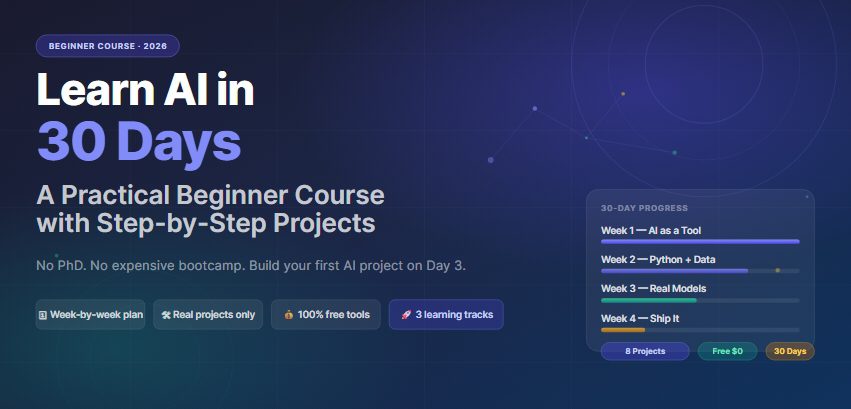


Learn AI in 30 Days:
A Practical Course with Real Projects
No PhD required. No $5,000 bootcamp. Just 30 days of focused, project-first learning — structured so that what you build on Day 7 actually prepares you for Day 21.
World Economic Forum
Here is the mistake nearly every beginner makes: they spend the first two weeks watching YouTube tutorials about neural networks and never open a terminal. By Day 14, they feel like they “understand AI” but cannot actually do anything with it. This guide is built around the opposite approach — you ship something on Day 3.
The 30-day structure below is not linear in the way most courses are. Each week is built around a project output, not a topic list. The theory exists to explain what you just built, not to prepare you for something you might build eventually.
This guide assumes 1–2 hours of daily practice. If you have less time, stretch it to 60 days — the sequence still works. Compressing it to less than 30 days is where most people break.
One more thing: the AI landscape genuinely changed between late 2024 and mid-2026. Learning AI today does not mean what it meant three years ago. You no longer need to implement a transformer from scratch to do useful work. The skill that matters in 2026 is knowing how to combine existing models, APIs, and tools to solve real problems — and that is exactly what this course teaches.
What’s covered
Who this is actually for — and who should skip it
This guide was built for three types of people: a marketing manager who wants to automate repetitive tasks with AI tools, a career changer with no technical background who wants to move into AI-adjacent roles, and a developer who already codes but has never touched machine learning. The roadmap works for all three, but it splits into two tracks at Week 2. More on that below.
Skip this guide if you already know Python and have built at least one ML model — you are past the entry level and will find the first two weeks too slow. Head directly to DeepLearning.AI’s short courses or the Hugging Face open-source curriculum instead.
Building solid AI literacy — enough to use tools fluently and explain what you’re doing — takes 4–8 weeks of daily practice. Getting technically skilled enough to build and deploy models takes 6–12 months. This guide gets you through the first gate. Everything else follows from there.
Two tracks — pick one before Day 8
The first week is identical for everyone. After that, the roadmap forks. You need to decide which outcome you’re building toward, because the projects in Weeks 2–4 are different depending on your answer.
Most people reading this should start with Track A. The instinct is to jump straight into Track B because it sounds more impressive — but Track B without Track A fundamentals is where 70% of beginners get stuck and quit. The Power User skills are also the ones that make you immediately useful at a job, which matters if you’re in a career transition.
Week 1: AI as a Tool (Days 1–7)
The goal of Week 1 is simple and non-negotiable: you will use AI every single day for real tasks, not toy exercises. By Day 7, AI should feel like a normal part of how you work — not a novelty you visit once a week.
The single biggest mistake Week 1 beginners make is reading about AI instead of using it. This week has zero theory sessions. Every day ends with something you made.
A note on the tools you’ll use this week: ChatGPT, Claude, and Gemini all have genuinely free tiers in 2026 that are useful for daily work — you do not need a paid subscription to get started. The differences between them matter, but Week 1 is not the moment to optimize. Use all three for different tasks and develop your own sense of where each one is strongest.
The 2026 AI Tool Landscape for Beginners
By mid-2026, the gap between the top general-purpose AI assistants has narrowed significantly, but each still has a distinct character. Here is an honest, non-sponsored comparison of the five tools you will use most in the first two weeks:
| Tool | Best for beginners | Free tier | Coding help | Long docs | Real-time web |
|---|---|---|---|---|---|
| ChatGPT (GPT-4o) | All-around; most tutorials assume this | Limited daily | ✓✓ | ✓ | ✓ |
| Claude (Sonnet 4.6) | Long documents, nuanced writing, research | Very limited | ✓✓ | ✓✓ | — |
| Google Gemini | Google Workspace users; most generous free tier | Most generous | ✓ | ✓ | ✓✓ |
| Perplexity AI | Research with citations; replaces Google for many queries | Good daily limit | — | — | ✓✓ |
| DeepSeek V4 | Coding tasks; surprisingly capable free tier | Very generous | ✓✓ | ✓ | — |
The practical strategy that costs nothing: create free accounts on all five platforms during Day 1, then settle into whichever two you use most naturally by Day 10. Most people end up with ChatGPT for general tasks and either Claude or Perplexity as a second tool. That is fine — the goal is fluency, not comprehensiveness.
DataCamp’s AI Learning Roadmap for 2026 is the most current structured guide for picking tools by role. The Coders Guild also maintains an updated free course list that is updated as models change.
Week 2: Python + Data (Track B) / Automation (Track A)
This is where the two tracks diverge. If you chose Track A, Week 2 is about building your first automation workflow — no code required. If you chose Track B, Week 2 is Python fundamentals, and it is genuinely hard. I will not pretend otherwise.
Python is the backbone of AI development. You do not need to be a great Python programmer to do useful AI work — but you need to be a functional one. The goal of this week is to reach “functional” as fast as possible.
The honest learning curve: Days 8–10 feel overwhelming. Syntax errors, confusing indentation, error messages that seem to blame everything except the actual problem. This is normal and temporary. Day 12 is where most people have their first real breakthrough — the moment they fix a bug on their own, without looking it up. That moment is worth protecting.
Variables, lists, dictionaries, for loops, functions, importing libraries, reading a CSV with pandas. That’s it. If you can do these 7 things fluently, you can start building ML projects. Everything else you’ll learn as you need it.
Track A’s Week 2 centers on automation. The tools that matter here are Make.com (formerly Integromat), Zapier, and for more advanced users, n8n. All have free tiers.
Week 3: First Real Models (Days 15–21)
Week 3 is where this guide diverges most sharply from standard AI courses. Most beginner courses at this point would have you watching lectures about backpropagation. This guide does not. You will use pre-trained models from Hugging Face to build something useful — and you will understand the underlying mechanics because you have something concrete to interrogate.
The Hugging Face Hub has over 900,000 models as of mid-2026, and the majority are free to use. This ecosystem is where most production AI work actually happens, and it is where you will spend a significant part of your career if you go deep into Track B.
Both tracks reconverge this week because the concept of using and combining pre-trained models is fundamental regardless of whether you write code or not.
Week 4: Build, Deploy, and Ship (Days 22–30)
Everything up to this point has been preparatory. Week 4 is where you build something you would actually show someone. The standard for “done” in Week 4 is: a public URL that works, a GitHub repo with a README someone else could follow, and a project you understand well enough to explain in a 10-minute conversation.
The deployment tools available in 2026 make this genuinely accessible. Streamlit Community Cloud, Hugging Face Spaces, and Render all have free tiers that can host a small AI app permanently at no cost.
Choose your capstone project (pick one):
The real learning curve — what no one tells you
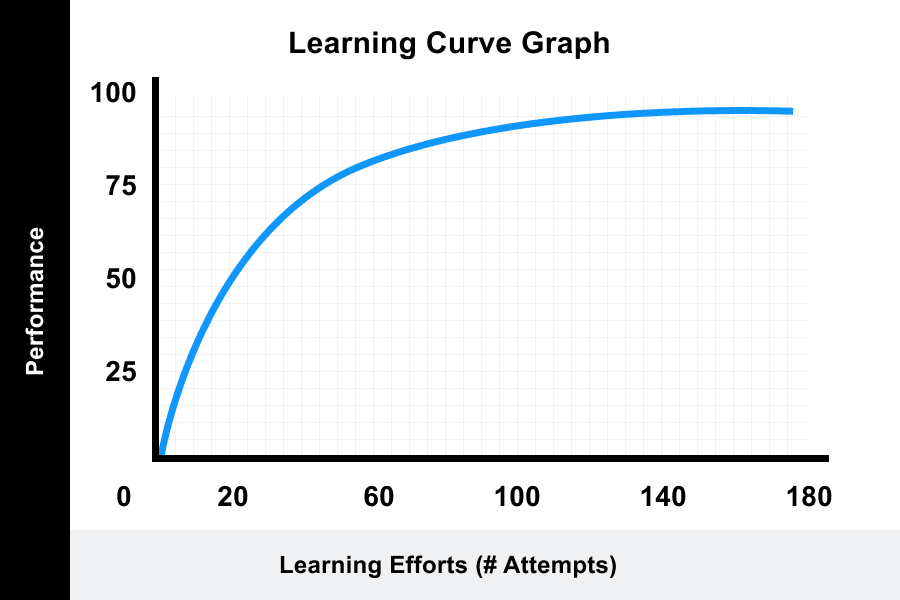
Every beginner AI learning guide shows a smooth upward curve. The actual experience looks more like this:
The “crisis of competence” that hits around Day 10 is not a sign that AI is too hard for you. It is a sign that your confidence has outpaced your actual skill — which is normal and temporary. Day 12 is where it usually turns. Day 22 often has a smaller version of the same dip, just before the final project clicks into place.
The 7 mistakes that end most beginner AI journeys
These are not theoretical warnings. Each of the following represents a specific failure mode I have watched beginners hit repeatedly. Some are invisible until it’s too late.
- Tutorial paralysisWatching 40 hours of content before building anything. Fix: Build on Day 3, no exceptions.
- Starting with the hardest thingOpening a “build GPT-4 from scratch” tutorial as your first project. Fix: Week 3’s RAG project is ambitious enough.
- Buying a course instead of using the toolsSpending $500 on a Udemy course that teaches 2023 content. Fix: The free resources in this guide are more current than most paid courses.
- Trying to understand all the math before buildingYou do not need a working knowledge of calculus to build a RAG pipeline. Fix: Learn the math that explains what you just built, not what you might build.
- Switching tracks mid-courseStarting Track B, hitting the Day 10 wall, and switching to Track A without finishing either. Fix: Pick one track before Day 8 and commit to it through Day 30.
- Never publishing anythingKeeping all projects local and never sharing them. Fix: GitHub or Hugging Face Spaces on Day 24 — public, even if imperfect.
- Chasing AI news instead of building skillsSpending 2 hours/day reading about GPT-5 and Claude Opus instead of building. Fix: 30 minutes of news, 90 minutes of building. Daily.
The best free resources — organized by week
Every resource below is free. I have removed courses that were good in 2024 but have not been updated since, because the LLM ecosystem moves fast enough that outdated courses teach outdated patterns.
DeepLearning.AI’s specializations on Coursera are the highest signal-to-noise ratio paid courses in 2026. If you finish the 30-day free roadmap and want to go deeper, the Machine Learning Specialization (Andrew Ng) is still the gold standard for core fundamentals. Financial aid is available and covers 100% of the cost for eligible learners.
What comes after Day 30 — and what you should not do
Day 30 is not the end. It is the first checkpoint. Here is what is worth pursuing next, and one thing that is not.
- 1Specialize, do not generalize AI has a dozen mature subfields. Pick the one closest to your existing domain — NLP if you work with text, computer vision if you work with images, MLOps if you’re an engineer who wants to deploy models. Specializing from Day 31 onward produces far better outcomes than continuing to study AI broadly.
- 2Build a second, harder project immediately The worst thing you can do after finishing Day 30 is take a two-week break. The neural pathways are still forming. Build Project 9 within 48 hours of finishing Project 8, even if it is smaller.
- 3Join a community, not just a Discord The Hugging Face forums, Kaggle discussion boards, and Papers With Code are where real practitioners talk. The noise-to-signal ratio is lower than most AI Discord servers, which tend to be 80% people asking “how do I get started” to each other.
- 4What NOT to do: start a second 30-day course The urge to restart the learning loop with a shinier course is real and counterproductive. What you need after Day 30 is not more structured learning — it is more unstructured building. Courses create the illusion of progress through completion percentages. Projects create actual progress through bugs you had to fix yourself.
Ready to start your AI journey?
Explore practical AI tools, guides, and resources for beginners and professionals at AIEarnerHub — updated regularly as the landscape evolves.
Visit AIEarnerHub →The thing nobody tells you about learning AI in 30 days: the first two weeks feel like you are learning too slowly, and the last two weeks feel like you are suddenly moving too fast. Both feelings are correct. Trust the projects, not the feelings.
If what you built by Day 30 would have taken you a week to do manually three months ago — the roadmap worked. That is the only metric that matters.